Quantization (shrinking a model)
On this page
Level: Intermediate · Reading time: 8 min · Phase: 3 · LLM Concepts
In one line: Quantization stores a model's weights as small integers (8-bit or 4-bit) instead of 16-bit decimals, so the model needs far less memory and often runs faster, at the cost of a small rounding error.
Before you start: Transformer Architecture, to know that a model is mostly a large set of weights.
Words to know:
- Weight: one learned number inside the model.
- Bit: a binary digit. An 8-bit integer has 256 possible values, and a 4-bit one has 16.
- Scale: the size of one integer step, used to turn integers back into decimals.
Explain it like I'm new
Think of a photo. A raw photo keeps millions of subtle colours. Save it as a smaller file with fewer colours, and most people cannot tell the difference. But if the photo has a very bright sun in one corner, a poor palette can wash out everything else.
A model is a huge pile of numbers called weights. Normally each weight is a 16-bit float, which takes 2 bytes. Quantization rounds each weight to one of a few allowed levels, such as 256 levels (8-bit) or 16 levels (4-bit). Each weight then takes 1 byte or half a byte. The model is the same shape, just stored with fewer "colours".
Watch it
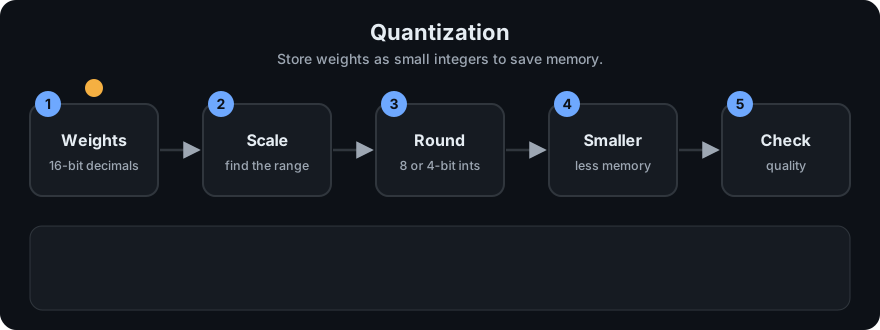
It plays on a loop. Read the caption in the box, one step at a time. Want to go at your own pace? Step through it with Previous and Next.
How it works
- Memory math: memory is parameters × bytes per weight. A 7-billion-parameter model is 7e9 × 2 bytes = 14 GB in 16-bit, and 7e9 × 0.5 bytes = 3.5 GB in 4-bit. This counts weights only. The KV cache and activations need extra memory.
- Pick a scale: find the biggest absolute weight in a block. Divide it by the biggest integer (127 for signed 8-bit). The result is the scale: the size of one integer step.
- Round: integer = round(weight / scale). Store the integers and the one scale.
- Dequantize: when the model runs, weight ≈ integer × scale.
- Rounding error: the weight can be off by at most half a step, so by at most scale / 2. Fewer bits means bigger steps and bigger error.
Symmetric vs asymmetric. Symmetric uses a range centred on zero, so zero maps to integer 0 and only a scale is needed. Asymmetric uses the real minimum and maximum, and adds a zero-point: the integer that stands for 0.0. It fits lopsided data better and costs one more number to store.
flowchart LR
    A[16-bit weights] --> B[Find scale per block]
    B --> C[Round to int8 / int4]
    C --> D[Store ints + scales]
    D --> E[Dequantize at run time: int x scale]
Why it works. Weights are very redundant. Nudging each one by a tiny amount barely changes the output, because errors are random and mostly cancel out across billions of weights.
Where it hurts.
- Outliers: one huge weight forces a big scale, so all the small weights round to zero. The fix is a separate scale for each small group of weights (for example 32 or 128). The LLM.int8() paper studies this for large models.
- Small models have less spare redundancy and lose more quality.
- Math and code answers are brittle: one wrong digit or symbol ruins them. Test these tasks after quantizing.
- Very low bits (3-bit and below) lose more than 8-bit or 4-bit.
PTQ vs QAT. Post-training quantization (PTQ) shrinks a model that is already trained. It is cheap and the usual choice. Quantization-aware training (QAT) simulates rounding during training so the model learns to cope. It is better at very low bits, but costs a training run.
Ecosystem names. You will see GGUF (the file format used by llama.cpp for running locally), GPTQ (paper) and AWQ (paper), which are PTQ methods that choose roundings carefully using sample data. Formats and tools change fast, so check each project's current docs.
Worked example
Take a block whose biggest weight is 0.13 and quantize to signed 8-bit (largest integer 127):
- Scale = 0.13 / 127 ≈ 0.001024.
- A weight of 0.05 becomes round(0.05 / 0.001024) = 49.
- Dequantize: 49 × 0.001024 ≈ 0.0502. The error is about 0.0002, at most scale / 2.
- With 4-bit (largest integer 7) the scale is 0.13 / 7 ≈ 0.0186, so the same weight lands on 3 and comes back as about 0.056. The steps are bigger, so the error is bigger.
Code example
The demo uses only the standard library and a seeded random generator. Run it: python 03-llm-concepts/code/llm_quantize.py
from llm_quantize import make_weights, quantize_symmetric, dequantize_symmetric, errors

w = make_weights(64, seed=0)
ints, scale = quantize_symmetric(w, 8)
mean_err, max_err = errors(w, dequantize_symmetric(ints, scale))
print(round(scale, 6), round(mean_err, 6), round(max_err, 6))   # -> 0.001028 0.000249 0.000507
print(max_err <= scale / 2)                                      # -> True
The real output of the full demo is:
first 4 weights: [0.0471, -0.0698, -0.034, 0.0185]
symmetric int8 : scale 0.001028 | mean abs err 0.000249 | max err 0.000507 | scale/2 0.000514
asymmetric int8: scale 0.000967 | zero-point 120 | mean abs err 0.000245 | max err 0.000465
symmetric 8-bit: mean abs err 0.000249
symmetric 4-bit: mean abs err 0.005096

7B-parameter model, weights only:
  32-bit:  4.0 bytes/weight ->  28.0 GB
  16-bit:  2.0 bytes/weight ->  14.0 GB
   8-bit:  1.0 bytes/weight ->   7.0 GB
   4-bit:  0.5 bytes/weight ->   3.5 GB

Outlier demo (4-bit, 64 weights, one weight set to 2.0):
  one scale for all  : mean abs err on the other 63 weights 0.044647
  one scale per 8    : mean abs err on the other 63 weights 0.006502
  with one scale, 63 of the other 63 weights rounded to exactly 0
Read it like this. Going from 8-bit to 4-bit makes the error about 20 times bigger (0.000249 to 0.005096). With one 2.0 outlier and a single 4-bit scale, every other weight rounds to zero. Giving each group of 8 its own scale cuts the error from 0.044647 to 0.006502.
The tests in test_llm_quantize.py check that the round-trip error stays within scale / 2, that the memory ratios are exact, and that per-group scales beat one shared scale on outliers.
In real projects you rarely quantize by hand. You load a pre-quantized model or ask a library to do it. Check the current docs: bitsandbytes (8-bit and 4-bit loading in the Hugging Face ecosystem) and llama.cpp (GGUF).
When to use it / when not to
| Situation | Quantize? |
|---|---|
| The model does not fit on your GPU or laptop | Yes. 8-bit or 4-bit is the usual fix |
| You want cheaper or faster serving, and quality tests still pass | Yes |
| Your task is exact maths, code or structured data | Careful. Test it against the 16-bit model first |
| You use a small model (about 1B parameters or less) | Careful. Quality drops faster |
| You will fine-tune it | Yes, with QLoRA, see LoRA and PEFT |
| You have plenty of memory and need the best possible quality | No need |
Common mistakes
- Quoting memory from weights only. The KV cache and activations also need memory.
- Using one scale for a whole big matrix when it has outliers.
- Judging quality by "it still talks fine". Run your own test set on both versions.
- Assuming 4-bit is always the best choice. 8-bit is safer when you have the memory.
- Mixing up the file format (GGUF) with the method (GPTQ, AWQ).
Recap
If you remember only three things:
- Quantization stores weights as small integers plus a scale, cutting memory by 2x to 4x.
- The cost is rounding error, which grows as the bit count falls and when outliers stretch the scale.
- Use a separate scale per small group, and test your real task after quantizing.
Interview questions
<details> <summary><b>1. How much memory does a 13B-parameter model need in 16-bit and in 4-bit?</b></summary>
Weights only: 13e9 × 2 bytes = 26 GB in 16-bit, and 13e9 × 0.5 bytes = 6.5 GB in 4-bit. Add memory for the KV cache and activations, so real use is higher. </details>
<details> <summary><b>2. Why does one outlier weight damage a whole quantized block?</b></summary>
The scale is set by the largest absolute value. A huge outlier makes the scale big, so each step is coarse and the many small weights round to zero or to the same few levels. Using a separate scale per small group keeps the outlier from affecting its neighbours. </details>
<details> <summary><b>3. What is the difference between PTQ and QAT?</b></summary>
PTQ quantizes an already-trained model, which is quick and cheap. QAT simulates rounding during training so the model adapts to it. QAT usually keeps more quality at very low bit widths but costs a training run. </details>
Go deeper
- LLM.int8() paper: https://arxiv.org/abs/2208.07339
- GPTQ paper: https://arxiv.org/abs/2210.17323
- AWQ paper: https://arxiv.org/abs/2306.00978
- QLoRA paper (4-bit base for fine-tuning): https://arxiv.org/abs/2305.14314
- bitsandbytes: https://github.com/TimDettmers/bitsandbytes
- llama.cpp (GGUF): https://github.com/ggml-org/llama.cpp
Prev: Structured Outputs · Next: LoRA and PEFT · Back to phase: Phase 3