Recursive Chunking
On this page
Level: Beginner · Reading time: 8 min · Phase: 1 — RAG Foundations
In one line: Recursive chunking splits text on the biggest natural break first (paragraphs), and only falls back to smaller breaks (lines, sentences, words) for pieces that are still too long.
Before you start: Chunking. You should know what a chunk is and why chunk size matters.
Explain it like I'm new
Imagine packing books into boxes that hold at most 5 kg. First you try to pack whole shelves. If a shelf is too heavy, you split it into individual books. If one book is still too heavy (an encyclopedia), only then do you split it into volumes. You never tear pages unless there is no other choice.
Recursive chunking does the same with text. It keeps paragraphs whole when they fit. When one is too long, it splits that paragraph by lines, then by sentences, then by words, and as a last resort by characters. The word recursive means the function calls itself on the pieces that are still too big, each time with a smaller separator.
A separator is the string used to split, for example "\n\n" (blank line between paragraphs), "\n" (line break), ". " (sentence end) and " " (space between words).
This is the most common default chunker because it respects the writer's structure at almost no cost.
Words to know:
- Separator: the string used to split text, such as a blank line or a space.
- Recursive: a function that calls itself on smaller pieces of its own input.
- Merge: join small neighbouring pieces into one chunk, as long as the total stays within the size limit.
- Fallback: the next, smaller separator to try when the current one is not enough.
- Chunk size: the maximum length of a chunk (here in characters).
Watch it
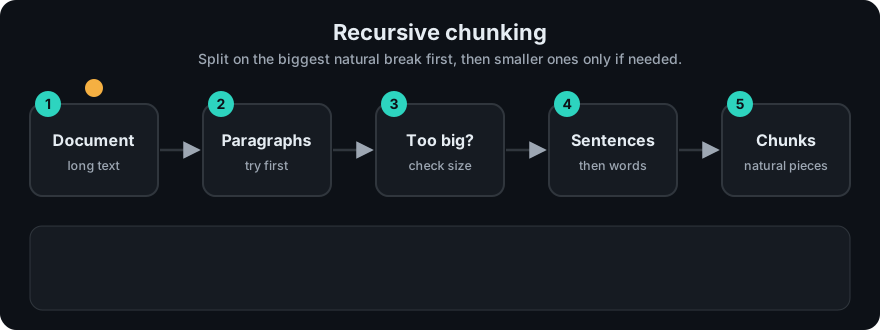
It plays on a loop. Read the caption in the box, one step at a time. Want to go at your own pace? Step through it with Previous and Next.
How it works
- If the text already fits the size limit, return it as one chunk.
- Otherwise, take the first separator in the list (e.g.
"\n\n") and split. - Walk through the pieces and merge neighbours into one chunk while the total still fits.
- If a single piece is still too big, call the same function on it with the remaining separators.
- If no separator is left, cut by characters.
flowchart TD
  T[Text] --> F{Fits size?}
  F -- yes --> OUT[Chunk]
  F -- no --> S[Split on next separator: paragraph, line, sentence, space]
  S --> M[Merge small neighbours up to size]
  M --> B{Any piece still too big?}
  B -- no --> OUT
  B -- yes --> F
Worked example, size 120: a document with three paragraphs of 80, 115 and 85 characters. Each fits alone, but no two fit together (80 + 115 = 195 > 120), so you get three chunks, each one a full paragraph. A 300-character paragraph would instead be split into sentences and repacked.
Worked example
The repo's sample text has three paragraphs of 81, 119 and 85 characters. We chunk it with size 120. Real output:
'Docker images are built in layers. Each instruction in a Dockerfile adds a layer.\n\n'
'Multi-stage builds use several FROM lines. Only the final stage ends up in the shipped image, so the image stays small.\n'
'Refresh tokens should live in an httpOnly cookie. Rotate refresh tokens on every use.'
Trace it:
- The whole text is far longer than 120, so split on
"\n\n"(paragraphs). - Paragraph 1 (81) fits. Adding paragraph 2 would give 81 + 119 = 200 > 120, so paragraph 1 becomes chunk 1.
- Paragraph 2 is 119 characters, but with its
"\n\n"separator put back it is 121, one too many. So the function calls itself on it with the next separator,"\n". That gives a chunk of 120 characters (it ends with a single newline). - Paragraph 3 (85) fits, and becomes chunk 3.
Result: 3 clean chunks, none cut mid-word. Compare this with the fixed-size chunks in Chunking.
Code example
From code/rag_chunkers.py:
SEPARATORS = ("\n\n", "\n", ". ", " ", "")

def recursive_chunks(text, size=200, separators=SEPARATORS):
    if len(text) <= size:
        return [text] if text.strip() else []
    sep, rest = separators[0], separators[1:]
    if sep == "":
        return [text[i:i + size] for i in range(0, len(text), size)]
    if sep not in text:
        return recursive_chunks(text, size, rest)
    parts = text.split(sep)
    pieces = [p + sep for p in parts[:-1]] + [parts[-1]]   # keep the separator
    chunks, current = [], ""
    for piece in pieces:
        if len(piece) > size:                 # still too big: go one level deeper
            if current:
                chunks.append(current); current = ""
            chunks.extend(recursive_chunks(piece, size, rest))
        elif len(current) + len(piece) <= size:
            current += piece                  # merge small neighbours
        else:
            chunks.append(current); current = piece
    if current:
        chunks.append(current)
    return [c for c in chunks if c.strip()]
In real projects (pip install langchain-text-splitters):
from langchain_text_splitters import RecursiveCharacterTextSplitter

splitter = RecursiveCharacterTextSplitter(
    chunk_size=500, chunk_overlap=50,
    separators=["\n\n", "\n", ". ", " ", ""],
)
chunks = splitter.split_text(long_text)
RecursiveCharacterTextSplitter.from_language(...) provides separators for source code (functions, classes) in many languages.
When to use it / when not to
- Good default for prose, Markdown, docs and most web pages.
- Use language-aware separators for code and Markdown headings.
- Not ideal when structure lies (PDFs extracted with broken line breaks) — clean the text first.
- If topics change mid-paragraph often, semantic chunking may cut in better places.
Common mistakes
- Measuring size in characters when the embedding model limit is in tokens. Most libraries accept a custom length function (e.g. a token counter).
- Dropping the separator, so sentences run together ("end.Start").
- Putting
" "before"\n\n"in the list, which defeats the point. - Forgetting overlap, so context at chunk borders is lost.
Recap
If you remember only three things:
- Recursive chunking tries big separators first (paragraphs) and only goes smaller for pieces that are still too long.
- Small neighbouring pieces are merged back together so each chunk is as full as possible without going over the limit.
- It is a fast, predictable default, but it measures size in characters unless you give it a token counter.
Interview questions
1. Why is recursive chunking a popular default? <details><summary>Answer</summary> It keeps natural units (paragraphs, sentences) intact when they fit, only splits further when needed, needs no model calls, and is fast and predictable. </details>
2. What happens when a single word is longer than the chunk size? <details><summary>Answer</summary> After all separators are used up, the last fallback (empty separator) cuts by characters, so every chunk still respects the size limit. </details>
3. How would you adapt it for source code? <details><summary>Answer</summary> Use separators that match code structure, such as class and function definitions first, then blank lines, then lines, so functions stay whole when possible. </details>
Go deeper
- LangChain text splitters (RecursiveCharacterTextSplitter) — https://python.langchain.com/
Prev: Chunking · Next: Semantic Chunking · Back to phase: Phase 1