AutoGen
On this page
Level: Advanced · Reading time: 10 min · Phase: 5 — Frameworks
In one line: AutoGen is Microsoft's framework for multi-agent systems where agents talk to each other by sending messages.
Before you start: You should know what an agent is (What is an AI agent), the multi-agent idea (Multi-agent systems) and the critic pattern (Reflection).
Explain it like I'm new
Think of a group chat. A coder posts a script, a reviewer replies with problems, the coder fixes them, and the chat ends when the reviewer says "approved". AutoGen builds agent systems around that conversation model.
The key idea is that agents are message-passing actors. Control flow comes from who talks to whom, and when the conversation stops.
Words to know (check the docs, since the project has had major version changes and several APIs):
- Agent — an entity that receives messages and replies, backed by an LLM, a human or code.
- Team / group chat — several agents taking turns under a rule, such as round-robin.
- Termination condition — a rule that ends the chat (a keyword, a max number of messages).
- Tool — a function an agent can call, including running generated code.
- Human proxy — an agent that asks a person for input.
- Actor — a small unit that keeps its own state and only talks by sending and receiving messages.
- Round-robin — taking turns in a fixed order: A, B, A, B, and so on.
- History — the shared list of all messages so far.
Watch it
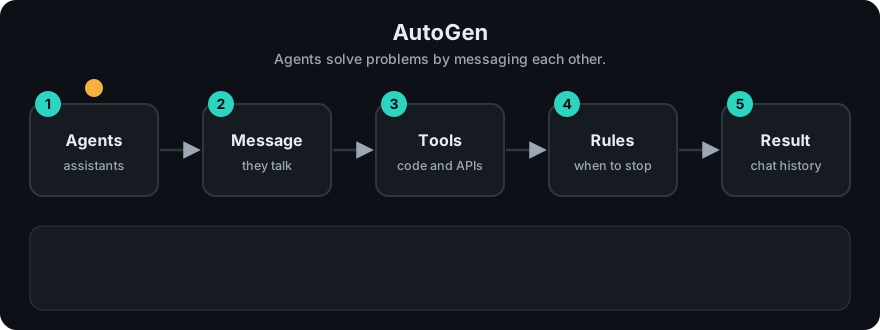
It plays on a loop. Read the caption in the box, one step at a time. Want to go at your own pace? Step through it with Previous and Next.
How it works
- Create agents with roles.
- Place them in a team with a turn-taking rule.
- Send a task as the first message.
- Agents reply in turn. Each sees the shared history.
- The run stops on the termination condition.
flowchart LR
    U[task] --> C[Coder] --> R[Reviewer]
    R -->|issues found| C
    R -->|APPROVED| E[stop]
Mapping: this is the multi-agent pattern from Phase 4, with the shared message history as memory. The reviewer loop is the "critic" or reflection pattern.
Worked example
The code example below has a fake coder and a fake reviewer taking turns. I ran it. The history grows like this:
- Start:
['write a function']. - Message 0, coder. No message contains the word "fix", so it adds
code v1. - Message 1, reviewer. The last message is not
code v2, so it addsplease fix the bug. - Message 2, coder. A message now contains "fix", so it adds
code v2. - Message 3, reviewer. The last message is
code v2, so it addsAPPROVED. - The word
APPROVEDis the termination condition, so the chat stops.
Final history: ['write a function', 'code v1', 'please fix the bug', 'code v2', 'APPROVED'].
Without step 6, the loop would only stop at max_msgs=10. That is why you always set a termination rule. Check the current docs for exact AutoGen classes, since they changed between versions.
Code example
From scratch, stdlib only. Two fake agents in a round-robin chat with a termination rule:
def coder(history):
    return "code v2" if any("fix" in m for m in history) else "code v1"

def reviewer(history):
    return "APPROVED" if history[-1] == "code v2" else "please fix the bug"

def chat(task, agents, max_msgs=10):
    history = [task]
    for i in range(max_msgs):
        msg = agents[i % len(agents)](history)
        history.append(msg)
        if "APPROVED" in msg:
            break
    return history

print(chat("write a function", [coder, reviewer]))
In real projects: AutoGen is split into layers and its API differs across versions. Read the current docs before writing code: https://microsoft.github.io/autogen/
When to use it / when not to
- Use it for research and prototypes of agents that debate, review or write and run code.
- Use it when conversation between agents is the natural model.
- Skip it for fixed, predictable workflows. Plain code or a graph is easier to test.
- Be careful with code execution: run it in a sandbox.
Common mistakes
- No termination condition, so agents chat forever and burn tokens.
- Running model-written code directly on your machine.
- Letting history grow without limit, which exceeds the context window.
- Using old tutorials from a different major version.
- Confusing a group chat with one agent that talks to itself. Each agent has its own role and instructions, and they only share the history.
Recap
If you remember only three things:
- In AutoGen, agents work by sending messages to each other, so the conversation is the program.
- It fits research and prototypes where agents debate, review, or write and run code.
- Run any generated code in a sandbox. For fixed, predictable workflows, plain code or a graph is easier to test.
Interview questions
- What is a termination condition? <details><summary>Answer</summary>A rule that stops a multi-agent chat, such as a keyword or a maximum message count. Without one, cost can grow without limit.</details>
- How does AutoGen differ from a graph framework? <details><summary>Answer</summary>Control flow emerges from conversation between agents, rather than from edges you define in advance.</details>
- Why sandbox code execution? <details><summary>Answer</summary>Model-written code is untrusted. A sandbox (container) limits damage from bugs or malicious output.</details>
Go deeper
- https://microsoft.github.io/autogen/