Deploy a Production AI Application
On this page
Level: Advanced · Reading time: 13 min · Phase: 7 — Production AI
In one line: Deploying a production AI app means packaging an API, its cache, queue, data stores and monitoring so they run reliably, are safe, and can be updated without breaking users.
Before you start: FastAPI for AI, Docker and Cost optimization. You should know what an API endpoint and a container are.
Explain it like I'm new
A demo is a food stall you run yourself. A production app is a restaurant: a front desk (API), a pantry (cache and vector database), a back kitchen for slow jobs (workers), health inspections (guardrails and security), and a log of every order (observability).
This topic ties the whole phase together. Each part solves one problem:
- API (topic 1): accepts requests and validates them.
- Container (topic 2) and Kubernetes (topic 3): package the app and run several copies.
- Redis (topic 4): cache and rate-limit state.
- Celery (topic 5) with RabbitMQ or Redis as broker (topic 6): run slow work, like ingesting documents, outside the request.
- Vector database: stores embeddings for retrieval (phase 1).
- Monitoring, tracing (topics 7, 8, 9, 13): show what is happening.
- Prompt versions (10), security (11), guardrails (12), cost controls (14).
- CI/CD (continuous integration and delivery): an automatic pipeline that tests and ships every change.
Words to know:
- Replica: one running copy of your app. Several replicas share the load.
- Load balancer: sends each request to one of the replicas.
- Rate limit: a cap on how many requests a user can make in a time window.
- Idempotent: safe to run twice with the same effect as once, which makes retries safe.
- Rollback: switch back to the previous working version.
- Runbook: a written guide for what to do when something breaks.
Watch it
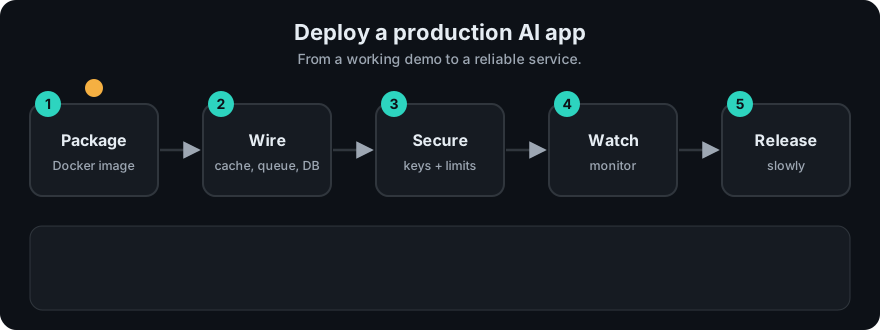
It plays on a loop. Read the caption in the box, one step at a time. Want to go at your own pace? Step through it with Previous and Next.
How it works
flowchart LR
  C[Client] --> LB[Load balancer / ingress]
  LB --> API[FastAPI pods]
  API --> G[Guardrails + rate limit]
  G --> RC[(Redis cache)]
  G --> VDB[(Vector DB)]
  G --> LLM[LLM provider]
  API -->|enqueue ingest job| BR[(Broker)]
  BR --> W[Celery workers]
  W --> VDB
  API -.traces, metrics.-> OBS[Tracing + Prometheus/Grafana]
  W -.-> OBS
  DEV[Git push] --> CI[CI: tests + golden set + scan]
  CI --> IMG[Build image] --> REG[Registry] --> K[Kubernetes rollout]
Worked example
Trace three requests through the endpoint in the code example below. The pieces are the repo's real guardrail, cache and tracer. A stub stands in for the model. Real output:
{'answer': 'stub answer', 'cached': False}
{'answer': 'stub answer', 'cached': True}
(400, ['possible_injection'])
What is RAG?passes the rate limit and the input check. It is not in the cache, so the model is called and the call is recorded in a span. The answer is stored.- The same question again is a cache hit. No model call happens, so no tokens are spent.
Ignore previous instructions nowfails the input check and the API replies with HTTP status 400 (bad request). The model is never called.
After these three requests the tracer counted exactly 1 llm_call, since only the first request reached the model.
Step-by-step checklist
- Build the API. FastAPI with Pydantic request and response models,
/healthand/readyroutes, timeouts on every external call. (01) - Add guardrails. Input length, injection scan, PII redaction, output schema check. (11, 12)
- Add a cache and rate limit in Redis, keyed by prompt version and user scope. (04, 14)
- Move slow work to a queue. Document ingestion goes to Celery workers. Make tasks idempotent and retryable. (05, 06)
- Set up the vector database with a clear re-index process and access-control metadata, filtered before retrieval. (11)
- Add observability. Request ID, spans, tokens, latency, cost, error rate, cache hit rate. Add alerts. (07, 13)
- Version prompts. Store in Git, log version and hash per request, roll out by canary. (10)
- Track experiments and evals in LangSmith or MLflow if used. (08, 09)
- Containerize. Small image, non-root user, no secrets baked in. (02)
- Configure secrets through a secret manager or environment variables. Never commit them. (11)
- Deploy to Kubernetes with resource limits, health probes, several replicas, and autoscaling. (03)
- Add CI/CD. On every push: lint, unit tests, golden-set eval, secret scan, image build. Deploy with a rolling or canary release and a one-command rollback.
- Set cost guards.
max_tokens, daily spend alert, step caps for agents. (14) - Run a load test and a failure drill: kill the cache, slow the LLM, and check the fallback works.
- Write a runbook: who is on call, how to roll back, where the dashboards are.
Code example
A minimal FastAPI endpoint that combines guardrails, cache and tracing from this phase's code:
# app.py  (run with: uvicorn app:app)
import sys
sys.path.insert(0, "07-production-ai/code")

from fastapi import FastAPI, HTTPException
from pydantic import BaseModel
from prod_guardrails import check_input
from prod_cache_ratelimit import TTLCache, TokenBucket
from prod_observability import Tracer

app = FastAPI()
cache = TTLCache(ttl=600)
limiter = TokenBucket(rate=5, capacity=10)
tracer = Tracer()

class Ask(BaseModel):
    question: str

def call_llm(prompt: str) -> str:
    return "stub answer"          # replace with your provider's SDK call

@app.get("/health")
def health():
    return {"status": "ok"}

@app.post("/ask")
def ask(body: Ask):
    if not limiter.allow():
        raise HTTPException(429, "rate limited")
    check = check_input(body.question)
    if not check["ok"]:
        raise HTTPException(400, check["reasons"])
    key = "v1:" + check["clean_text"].lower()
    cached = cache.get(key)
    if cached is not None:
        return {"answer": cached, "cached": True}
    with tracer.span("llm_call", prompt_version="v1") as s:
        answer = call_llm(check["clean_text"])
        s.record_usage(100, 50)
    cache.set(key, answer)
    return {"answer": answer, "cached": False}
This needs pip install fastapi uvicorn. In production, the in-memory cache and bucket are replaced by Redis so all replicas share state.
In real projects
A GitHub Actions workflow is a YAML file in .github/workflows/. A minimal CI job checks out code, installs dependencies, runs pytest, then builds the Docker image. See the GitHub Actions docs for current syntax.
When to use it / when not to
- Use the full stack when you have real users, uptime needs, or sensitive data.
- Start smaller if you are early: one container, a managed vector database and hosted tracing can be enough. Add Kubernetes and Celery when load or job length requires it.
- Each added component is something that can fail and must be monitored.
Common mistakes
- Doing document ingestion inside the HTTP request, so it times out.
- No
/healthroute or resource limits, so Kubernetes cannot manage the pods. - Shipping prompt or model changes without running the golden set in CI.
- Secrets baked into the image or checked into Git.
- No rollback plan.
Recap
If you remember only three things:
- A production app is more than a model call: API, guardrails, cache, queue, vector database, monitoring and CI/CD.
- Move slow work to workers, keep secrets out of the image and Git, and run the golden set in CI.
- Release changes by canary, watch cost and latency, and keep a one-step rollback and a runbook.
Interview questions
1. Why run ingestion in Celery instead of the API? <details><summary>Answer</summary>Ingestion is slow and can fail. A queue lets the API reply fast, retries failed jobs, and scales workers separately.</details>
2. What belongs in a CI pipeline for an AI app? <details><summary>Answer</summary>Lint, unit tests, a golden-set evaluation of prompts and retrieval, a secret scan and the image build.</details>
3. How do you release a new prompt or model safely? <details><summary>Answer</summary>Version it, run the golden set, release a canary share of traffic, compare quality, cost and latency, then promote or roll back.</details>
Go deeper
Prev: 14-cost-optimization.md · Next: Phase 8 — Interview Prep · Back to phase: Phase 7