Docker
On this page
Level: Beginner · Reading time: 9 min · Phase: 7 — Production AI
In one line: Docker packs your app and everything it needs into an image that runs the same way on any machine.
Before you start: FastAPI for AI. It helps to know what a web API is and what requirements.txt lists.
Explain it like I'm new
Think of a lunchbox. You pack the food, the fork and the napkin. Wherever you open it, you get the same meal. "It works on my laptop" stops being a problem because the laptop's Python version no longer matters.
An image is the read-only package (your code, Python, libraries). A container is a running copy of an image. A Dockerfile is the recipe that builds the image. A registry (Docker Hub, GitHub Container Registry) stores images so servers can pull them.
Images are built in layers. Each Dockerfile instruction makes a layer. Docker caches layers, so if nothing changed in a step, it reuses the old layer. That is why order matters: copy requirements.txt and install packages before copying your code. Your code changes often; dependencies rarely.
Words to know: -
Watch it
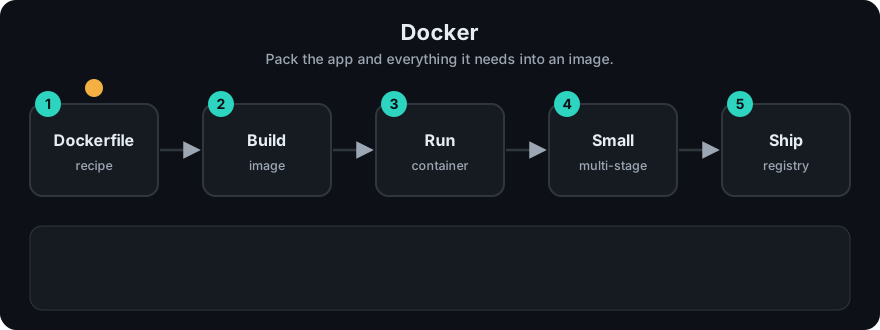
It plays on a loop. Read the caption in the box, one step at a time. Want to go at your own pace? Step through it with Previous and Next.
How it works
- Write a
Dockerfile. docker build -t rag-api:1.0 .builds the image.docker run -p 8000:8000 --env-file .env rag-api:1.0starts a container.- Push the image to a registry; your server or Kubernetes pulls it.
Dockerfile step            Layer cached until...
FROM python:3.12-slim      base image changes
COPY requirements.txt      requirements.txt changes
RUN pip install ...        (reruns only if the line above changed)
COPY . .                   any code file changes   <- changes most often, goes last
Worked example
You build the Dockerfile above for the first time. Every step runs, and each result is saved as a layer.
You then edit only main.py and rebuild:
FROM python:3.12-slim: nothing changed, so the layer is reused.COPY requirements.txt .: the file is the same, so it is reused.RUN pip install ...: its input is unchanged, so it is reused. This is the slow step you just skipped.COPY . .: your code changed, so this layer and everything after it rebuild.
If COPY . . came first, step 4's change would invalidate the pip install layer too, and every edit would reinstall all packages. The stdlib sketch below shows the same idea: its second line prints pip install: cached and copy code: rebuilt.
Code example
Stdlib sketch of the layer-cache idea: a step reruns only if its input hash changes.
import hashlib

cache = {}

def run_step(name, inputs: str):
    key = (name, hashlib.sha256(inputs.encode()).hexdigest())
    if key in cache:
        return f"{name}: cached"
    cache[key] = True
    return f"{name}: rebuilt"

reqs = "fastapi\nuvicorn"
print(run_step("pip install", reqs), run_step("copy code", "v1"))
print(run_step("pip install", reqs), run_step("copy code", "v2"))  # code changed only
In real projects
A Dockerfile for a Python API: slim base, dependencies first, non-root user.
FROM python:3.12-slim

ENV PYTHONDONTWRITEBYTECODE=1 \
    PYTHONUNBUFFERED=1

WORKDIR /app

# 1. dependencies first: this layer is cached until requirements.txt changes
COPY requirements.txt .
RUN pip install --no-cache-dir -r requirements.txt

# 2. then the code
COPY . .

# 3. do not run as root
RUN useradd --create-home appuser
USER appuser

EXPOSE 8000
CMD ["uvicorn", "main:app", "--host", "0.0.0.0", "--port", "8000"]
Add a .dockerignore file listing .git, .env, __pycache__ and .venv so secrets and junk never enter the image. Never COPY your .env into an image. Pass secrets at run time. See the Docker docs.
When to use it / when not to
- Use it for every service you deploy, and for local databases (Redis, Postgres) via Docker Compose.
- Pin versions (
python:3.12-slim, pinnedrequirements.txt) for repeatable builds. - Large local models can make images many gigabytes. Consider mounting model files as a volume or downloading at startup.
- GPU workloads need extra setup (a GPU-enabled runtime). Check the docs for your platform.
Common mistakes
COPY . .before installing requirements. Every code edit reinstalls all packages.- Running as root.
- Baking API keys into the image.
- Using the
latesttag in production. You cannot tell what version is running. - Forgetting
--host 0.0.0.0, so the app is unreachable from outside the container.
Recap
If you remember only three things:
- An image is the package; a container is a running copy of it.
- Docker reuses cached layers, so put rarely-changing steps (dependencies) before often-changing ones (code).
- Never put secrets in the image. Pass them at run time.
Interview questions
1. Image vs container? <details><summary>Answer</summary>An image is the packaged, read-only template. A container is a running instance of it.</details>
2. Why copy requirements.txt before the code? <details><summary>Answer</summary>Layer caching. Dependencies are reinstalled only when requirements change, which makes rebuilds fast.</details>
3. How do you pass an API key to a container safely? <details><summary>Answer</summary>At run time through environment variables or a secrets manager, never inside the image or the repo.</details>
Go deeper
Prev: 01-fastapi-for-ai.md · Next: 03-kubernetes.md · Back to phase: Phase 7