Kubernetes
On this page
Level: Intermediate · Reading time: 11 min · Phase: 7 — Production AI
In one line: Kubernetes runs many containers across many machines and keeps them healthy, scaled and reachable.
Before you start: Docker. You should know what an image and a container are.
Explain it like I'm new
Think of a shift manager at a busy store. You say "I want 3 cashiers at all times." If one goes home sick, the manager calls in a replacement. If the line grows, the manager adds more. You describe the goal; the manager does the work.
Kubernetes (often written "K8s", because there are 8 letters between K and s) works the same way. You write a desired state in YAML (a plain-text config format). Kubernetes keeps comparing reality to it and fixes differences.
Key words:
- Pod: the smallest unit; one or more containers running together.
- Deployment: says "run N copies of this pod" and handles rolling updates.
- Service: a stable address that load-balances across pods, because pod IPs change.
- Probes: health checks. A liveness probe restarts a stuck container. A readiness probe keeps traffic away until the app is ready (important when a model takes time to load).
- Resource requests/limits: how much CPU and memory a pod is guaranteed and how much it may use.
Words to know: -
Watch it
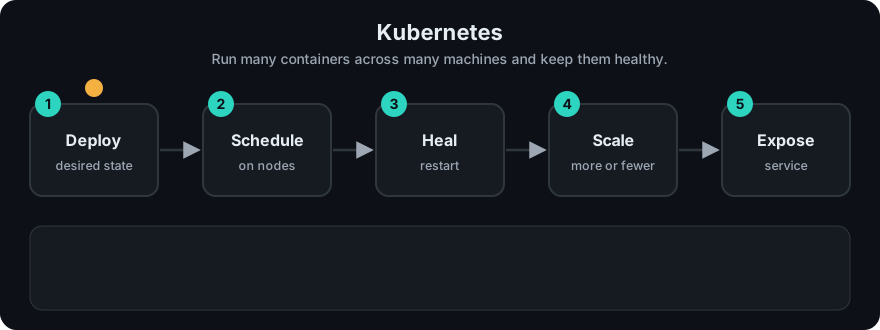
It plays on a loop. Read the caption in the box, one step at a time. Want to go at your own pace? Step through it with Previous and Next.
How it works
- You build and push an image to a registry.
- You apply a Deployment and a Service with
kubectl apply -f. - The scheduler places pods on nodes that have enough free resources.
- The Service sends traffic only to pods that pass readiness.
- An autoscaler (the Horizontal Pod Autoscaler, HPA) can add pods when CPU is high.
flowchart LR
  U[Users] --> S[Service]
  S --> P1[Pod 1]
  S --> P2[Pod 2]
  S --> P3[Pod 3]
  D[Deployment: replicas 3] -.manages.-> P1
  D -.manages.-> P2
  D -.manages.-> P3
Worked example
You apply a Deployment with replicas: 3. Kubernetes starts pod-a, pod-b and pod-c, and the Service sends users to all three.
pod-ccrashes. Actual state is 2 pods, desired is 3.- The Deployment notices the gap and starts a replacement pod.
- The Service skips the new pod until its readiness probe passes, then includes it again.
The stdlib sketch below does the same thing with two pods left and desired = 3. It adds one and prints ['pod-a', 'pod-b', 'pod-2'].
Code example
Stdlib sketch of the control loop: compare desired and actual, then fix.
desired = 3
pods = ["pod-a", "pod-b"]  # one crashed

def reconcile(desired, pods):
    while len(pods) < desired:
        pods.append(f"pod-{len(pods)}")
    while len(pods) > desired:
        pods.pop()
    return pods

print(reconcile(desired, pods))
In real projects
A minimal Deployment and Service for the API from topic 1:
apiVersion: apps/v1
kind: Deployment
metadata:
  name: rag-api
spec:
  replicas: 2
  selector:
    matchLabels:
      app: rag-api
  template:
    metadata:
      labels:
        app: rag-api
    spec:
      containers:
        - name: api
          image: ghcr.io/your-org/rag-api:1.0.0   # use a pinned tag
          ports:
            - containerPort: 8000
          env:
            - name: LLM_API_KEY
              valueFrom:
                secretKeyRef:
                  name: llm-secrets
                  key: api-key
          readinessProbe:
            httpGet:
              path: /health
              port: 8000
            initialDelaySeconds: 5
            periodSeconds: 10
          livenessProbe:
            httpGet:
              path: /health
              port: 8000
            initialDelaySeconds: 15
            periodSeconds: 20
          resources:
            requests:
              cpu: "250m"
              memory: "256Mi"
            limits:
              cpu: "1"
              memory: "512Mi"
---
apiVersion: v1
kind: Service
metadata:
  name: rag-api
spec:
  selector:
    app: rag-api
  ports:
    - port: 80
      targetPort: 8000
The numbers are starting points, not recommendations; measure your own app. Create the secret with kubectl create secret generic llm-secrets --from-literal=api-key=.... See the Kubernetes docs.
When to use it / when not to
- Use it when you run several services, need rolling updates, autoscaling and self-healing.
- Skip it for a single small app. A managed platform or one VM with Docker Compose is simpler.
- Kubernetes has a real learning curve and operating cost. Managed offerings from cloud providers reduce it.
Common mistakes
- No resource limits, so one pod starves its neighbours.
- A liveness probe that fails while the model is still loading, causing restart loops. Use readiness, or a startup delay.
- Secrets written in plain YAML in Git.
- Using the
latestimage tag. - Scaling pods but forgetting the LLM provider's rate limits.
Recap
If you remember only three things:
- You describe the desired state; Kubernetes keeps comparing it to reality and fixes the gap.
- A Deployment keeps N pods running, and a Service gives them one stable address.
- Readiness decides who gets traffic; liveness decides who gets restarted.
Interview questions
1. Readiness vs liveness probe? <details><summary>Answer</summary>Readiness decides whether the pod receives traffic. Liveness decides whether the container should be restarted.</details>
2. Why a Service in front of pods? <details><summary>Answer</summary>Pods come and go and their IPs change. A Service gives a stable name and load-balances across healthy pods.</details>
3. Do you always need Kubernetes for an LLM app? <details><summary>Answer</summary>No. For small apps a managed container platform or a single VM is cheaper to run. Use Kubernetes when scale and operations justify it.</details>
Go deeper
Prev: 02-docker.md · Next: 04-redis.md · Back to phase: Phase 7