Redis
On this page
Level: Intermediate · Reading time: 10 min · Phase: 7 — Production AI
In one line: Redis is a very fast in-memory data store, used in AI apps for caching answers, rate limiting (capping how many requests a user can make) and sharing state.
Before you start: FastAPI for AI. You should know what an LLM call costs in time and money.
Explain it like I'm new
Think of a sticky note on your monitor. Looking up a phone number in a big directory takes a minute. If you wrote it on a note, you read it in a second. But sticky notes get old, so you throw them out after a while.
Redis is the sticky-note wall for your servers. Data lives in memory, so reads take well under a millisecond on a good network. An LLM call takes seconds and costs money, so answering a repeat question from Redis saves both.
Key ideas:
- Key-value: you store a value under a key, such as
answer:<hash>. - TTL (time to live): the key deletes itself after N seconds. This stops stale answers from living forever.
- Exact cache: the key is a hash of the exact prompt. Same text, same hit.
- Semantic cache: you embed the question and look for a similar earlier question. It catches rephrasing but can return a wrong answer if the similarity threshold is too loose.
Words to know: -
Watch it
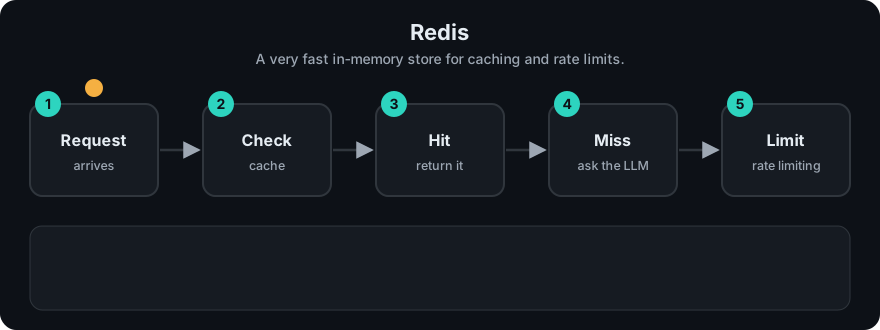
It plays on a loop. Read the caption in the box, one step at a time. Want to go at your own pace? Step through it with Previous and Next.
How it works
- A request arrives. Normalize the question (trim, lowercase).
- Build a key, such as
sha256(model + prompt_version + question). GETthe key. On hit, return it.- On miss, call the LLM, then
SET key value EX 3600. - Track hit rate. If it is very low, the cache is not paying for itself.
flowchart LR
  Q[Question] --> K[Make key]
  K --> R{In Redis?}
  R -- hit --> A[Return cached answer]
  R -- miss --> L[Call LLM]
  L --> W[SET with TTL]
  W --> A
Worked example
This follows the repo demo prod_cache_ratelimit.py, with a cache and a limiter.
The cache sees the questions hi, hi, bye, hi:
hi: miss, so compute and store it.hi: hit, served from the cache.bye: miss, so compute and store it.hi: hit again.
That is 2 hits out of 4 lookups, and the demo prints hit rate: 0.5.
The rate limiter is a token bucket holding 3 tokens. Each request spends one. Five requests arrive almost at once, so the first three find a token and the last two do not. The demo prints [True, True, True, False, False]: 3 of 5 allowed.
Code example
A stdlib exact cache with TTL and hit-rate stats. See prod_cache_ratelimit.py (tests in test_prod_cache_ratelimit.py).
import hashlib, sys
sys.path.insert(0, "07-production-ai/code")
from prod_cache_ratelimit import TTLCache

cache = TTLCache(ttl=3600)

def answer(question, model="demo-model"):
    key = hashlib.sha256(f"{model}|{question.strip().lower()}".encode()).hexdigest()
    hit = cache.get(key)
    if hit is not None:
        return hit
    result = f"(LLM answer to: {question})"  # pretend LLM call
    cache.set(key, result)
    return result

for q in ["What is RAG?", "what is rag? ", "What is MCP?"]:
    answer(q)
print("hit rate:", round(cache.hit_rate, 2))
In real projects
With the redis Python package (pip install redis) and a running Redis server:
import hashlib
import redis

r = redis.Redis(host="localhost", port=6379, decode_responses=True)

def cached_answer(question: str, model: str = "my-model") -> str:
    key = "answer:" + hashlib.sha256(f"{model}|{question.strip().lower()}".encode()).hexdigest()
    hit = r.get(key)
    if hit is not None:
        return hit
    result = call_llm(question)          # your function
    r.set(key, result, ex=3600)          # expires in 1 hour
    return result
For a semantic cache, store an embedding next to each answer and search by vector similarity. Redis supports vector search, but check the Redis docs for the current setup, or use a dedicated library. Include the model name and prompt version in the key, otherwise a prompt change keeps serving old answers.
When to use it / when not to
| Cache type | Good for | Risk |
|---|---|---|
| Exact | FAQs, repeated queries, fixed prompts | Low hit rate on free-form text |
| Semantic | Rephrased questions | Wrong answer if threshold is loose |
- Do not cache answers that depend on the user (private data) unless the key includes the user or tenant.
- Do not cache time-sensitive answers with a long TTL.
Common mistakes
- No TTL, so memory fills up and answers go stale.
- Cache key missing the model, prompt version or tenant.
- Caching error responses.
- A semantic threshold picked by guess, with no test on real queries.
- Treating Redis as the only copy of important data. It is a cache first.
Recap
If you remember only three things:
- A cache answers repeat questions from memory instead of paying for another LLM call.
- Always set a TTL, and put the model, prompt version and tenant in the key.
- A rate limiter caps requests; the demo allowed 3 of 5.
Interview questions
1. Exact vs semantic cache? <details><summary>Answer</summary>Exact matches identical text through a hash key. Semantic matches similar meaning through embeddings. Semantic hits more often but can return a wrong answer.</details>
2. Why use a TTL? <details><summary>Answer</summary>It limits staleness and memory use. Documents and prompts change, so old answers must expire.</details>
3. What should be in the cache key? <details><summary>Answer</summary>The normalized question, model, prompt version, and tenant or user if answers differ per user.</details>
Go deeper
Prev: 03-kubernetes.md · Next: 05-celery.md · Back to phase: Phase 7