Celery
On this page
Level: Intermediate · Reading time: 9 min · Phase: 7 — Production AI
In one line: Celery runs slow jobs (like document ingestion) in background workers so your API can answer fast.
Before you start: Redis and FastAPI for AI. Redis is a common broker, and FastAPI is where tasks are started.
Explain it like I'm new
Think of dropping off dry cleaning. You hand over the clothes, get a ticket, and leave. You do not stand there for two days. Someone in the back does the work, and you check with the ticket later.
In a RAG system, ingesting a 300-page PDF (parse, chunk, embed, store) can take minutes. A web request should not wait that long. The API puts a task on a queue and returns a task ID at once. A separate worker process picks up the task and runs it.
Words to know:
- Broker: the message store between API and workers, such as Redis or RabbitMQ.
- Worker: a process that runs tasks.
- Result backend: where task status and results are stored (optional).
- Retry: run a failed task again, usually with a delay.
- Idempotent: safe to run twice with the same result. Tasks should be, because retries happen.
- Dead-letter list: where tasks go after they fail every retry, so you can inspect them.
- Serialize: turn a function call into text or bytes that can travel through the broker.
Watch it
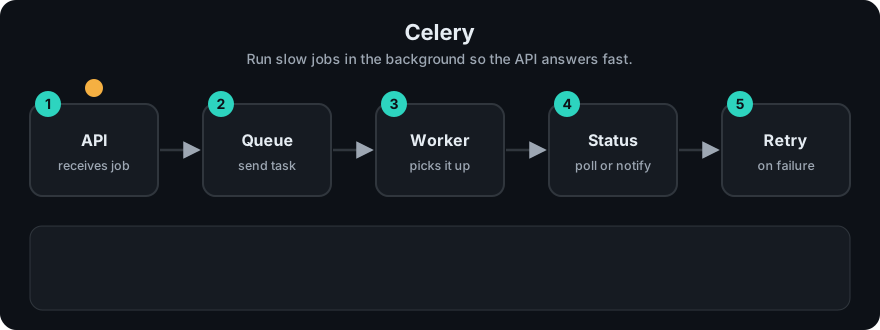
It plays on a loop. Read the caption in the box, one step at a time. Want to go at your own pace? Step through it with Previous and Next.
How it works
- The API calls
ingest_document.delay(path). - Celery serializes the call and sends it to the broker.
- A worker takes the message and runs the function.
- On failure, the task retries up to a limit.
- The client polls
GET /tasks/<id>for status.
flowchart LR
  API[FastAPI] -->|delay| B[(Broker)]
  B --> W1[Worker 1]
  B --> W2[Worker 2]
  W1 --> V[(Vector DB)]
  W2 --> V
  W1 -.status.-> RB[(Result backend)]
Worked example
This follows the repo demo prod_task_queue.py, with 2 workers and 1 retry allowed. Three tasks are submitted: embed("hello"), embed("bad"), embed("world!").
- Task 1 returns the length of
hello, which is5. - Task 2 raises
ValueError('cannot parse'). It is retried once and fails again, so it goes to the dead-letter list. - Task 3 returns the length of
world!, which is6.
The demo prints {1: 5, 3: 6} [(2, 'embed', "ValueError('cannot parse')")]. The two good tasks have results. The bad one did not block them and is kept for inspection.
Code example
A stdlib in-process version with workers, retries and a dead-letter list: prod_task_queue.py.
import sys
sys.path.insert(0, "07-production-ai/code")
from prod_task_queue import TaskQueue

q = TaskQueue(workers=2, max_retries=1)

@q.task
def ingest(doc):
    if doc == "corrupt.pdf":
        raise ValueError("cannot parse")
    return f"{doc}: 12 chunks"

q.start()
for d in ["a.pdf", "corrupt.pdf", "b.pdf"]:
    q.submit("ingest", d)
q.join(); q.stop()
print(q.results)
print("dead letters:", q.dead_letters)
In real projects
# tasks.py
from celery import Celery

app = Celery("tasks", broker="redis://localhost:6379/0", backend="redis://localhost:6379/1")


@app.task(bind=True, max_retries=3, default_retry_delay=30)
def ingest_document(self, path: str):
    try:
        chunks = parse_and_chunk(path)      # your functions
        embed_and_store(chunks)
        return {"path": path, "chunks": len(chunks)}
    except TransientError as exc:           # e.g. network hiccup
        raise self.retry(exc=exc)
Start a worker with celery -A tasks worker --loglevel=info. Call it from FastAPI with ingest_document.delay("/data/report.pdf"). A RabbitMQ broker URL looks like amqp://user:pass@localhost:5672//. See the Celery docs for configuration details.
When to use it / when not to
- Use it for ingestion, batch embedding, report generation, scheduled jobs.
- Do not use it for the fast path of a chat answer; streaming from the API is simpler.
- For tiny apps, FastAPI's built-in
BackgroundTasksmay be enough, but those die with the server process and have no retries.
Common mistakes
- Tasks that are not idempotent, so a retry duplicates data.
- Passing big objects (whole files) through the broker. Pass a path or ID.
- No retry limit or dead-letter handling, so bad jobs loop forever.
- Running workers with a different code version than the API.
- Not setting timeouts on external calls inside tasks.
Recap
If you remember only three things:
- Celery moves slow work out of the web request and into worker processes.
- The API gets a task ID at once; the broker holds the tasks between API and workers.
- Make tasks idempotent and limit retries, so bad jobs land in a dead-letter list instead of looping.
Interview questions
1. Why not ingest inside the API request? <details><summary>Answer</summary>It is slow and ties up the web server. Requests time out and a crash loses the work. A queue plus workers gives retries and scaling.</details>
2. What is a broker? <details><summary>Answer</summary>The message store that holds tasks between producers and workers, for example Redis or RabbitMQ.</details>
3. Why make tasks idempotent? <details><summary>Answer</summary>Retries and duplicate deliveries happen. An idempotent task gives the same final state when run more than once.</details>
Go deeper
Prev: 04-redis.md · Next: 06-rabbitmq.md · Back to phase: Phase 7