RabbitMQ
On this page
Level: Intermediate · Reading time: 9 min · Phase: 7 — Production AI
In one line: RabbitMQ is a message broker: producers send messages to it, and it routes them safely to the queues that consumers read from.
Before you start: Celery. You should know what a background task and a broker are.
Explain it like I'm new
Think of a post office. You do not hand a letter to the recipient. You drop it at the post office, which sorts it and puts it in the right mailbox. The recipient picks it up when ready. If they are away, the letter waits.
RabbitMQ is that post office for software. It lets a fast API hand work to slow workers without waiting, and it keeps the work if a worker crashes.
Words to know:
- Producer: sends messages (your API).
- Consumer: receives and processes messages (a worker).
- Queue: a buffer that holds messages in order until consumed.
- Exchange: receives messages from producers and routes them to queues using rules.
- Binding / routing key: the rule linking an exchange to a queue.
- Ack (acknowledgement): the consumer tells RabbitMQ "done". Without an ack, the message is redelivered.
- Dead-letter queue (DLQ): where messages go after repeated failure or expiry, so you can inspect them.
- Nack (negative acknowledgement): the consumer says "I failed". The broker can requeue the message or send it to the DLQ.
Watch it
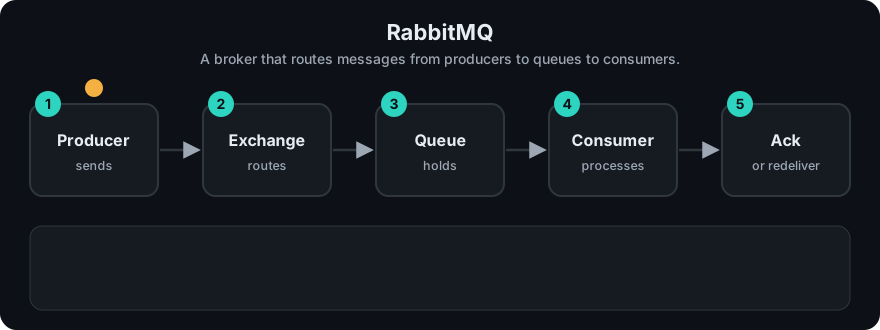
It plays on a loop. Read the caption in the box, one step at a time. Want to go at your own pace? Step through it with Previous and Next.
How it works
- A producer publishes a message to an exchange with a routing key.
- The exchange routes it to matching queues. Common types: direct (exact key), fanout (all queues), topic (key patterns).
- A consumer takes a message, processes it, and sends an ack.
- If the consumer dies before acking, the message returns to the queue.
- Messages that keep failing go to a dead-letter queue.
flowchart LR
  P[Producer: API] --> E{Exchange}
  E -- key: ingest --> Q1[ingest queue]
  E -- key: embed --> Q2[embed queue]
  Q1 --> C1[Worker A]
  Q2 --> C2[Worker B]
  Q1 -. failures .-> DLQ[Dead-letter queue]
Worked example
Your API publishes the message doc1 to the exchange with routing key ingest.
- The exchange matches the key
ingestand puts the message in theingestqueue. - Worker A takes
doc1and processes it. - Worker A sends an ack, so RabbitMQ deletes the message.
- If Worker A had crashed before the ack, the message would return to the queue for another worker.
- If a worker sends a nack and retries run out, the message goes to the DLQ.
The stdlib toy below publishes doc1, bad and nowhere/x. The key nowhere matches no queue, so x goes to dead straight away. Consuming doc1 works, and consuming bad fails. The toy prints ingest processed doc1 None dead: ['x', 'bad'].
Code example
A stdlib toy of a direct exchange with queues and a dead-letter list:
from collections import deque

queues = {"ingest": deque(), "embed": deque()}
dead = []

def publish(routing_key, message):
    if routing_key not in queues:
        dead.append(message)          # unroutable -> dead letter
    else:
        queues[routing_key].append(message)

def consume(name):
    msg = queues[name].popleft()
    try:
        if msg == "bad":
            raise ValueError
        return f"{name} processed {msg}"
    except ValueError:
        dead.append(msg)              # failed -> dead letter
        return None

publish("ingest", "doc1"); publish("ingest", "bad"); publish("nowhere", "x")
print(consume("ingest"), consume("ingest"), "dead:", dead)
The runnable queue with retries is in prod_task_queue.py.
In real projects
You usually do not call RabbitMQ directly. Celery uses it as its broker through a URL:
app = Celery("tasks", broker="amqp://guest:guest@localhost:5672//")Run a local broker with the official Docker image (see the RabbitMQ docs for the current image tag and ports). The management UI is a good way to watch queue lengths. Change the default guest credentials outside local development.
When to use it / when not to
| Need | Redis as broker | RabbitMQ |
|---|---|---|
| Simple background jobs | Good fit | Works |
| Complex routing, many queues | Limited | Strong fit |
| Delivery guarantees, acks, DLQ | Basic | Built in |
| Extra services to run | You may already run Redis | One more system |
- Do not add RabbitMQ if a single Redis already meets your needs.
Common mistakes
- Auto-acking before the work is done, so a crash loses the job.
- No dead-letter queue, so poison messages block the queue or vanish.
- Unbounded queue growth. Watch queue length and alert on it.
- Large payloads in messages. Send IDs or paths.
- Default credentials left on a public host.
Recap
If you remember only three things:
- A producer sends to an exchange, the exchange routes to queues, and consumers read from queues.
- The consumer acks only after the work is done, so a crash does not lose the message.
- A dead-letter queue keeps messages that keep failing so you can inspect them.
Interview questions
1. Queue vs exchange? <details><summary>Answer</summary>A queue stores messages. An exchange receives them from producers and routes them to queues by binding rules.</details>
2. What does an ack do? <details><summary>Answer</summary>It tells the broker the message was processed, so it can be removed. Without it the message is redelivered.</details>
3. What is a dead-letter queue for? <details><summary>Answer</summary>It holds messages that failed too many times or expired, so you can inspect and replay them.</details>
Go deeper
Prev: 05-celery.md · Next: 07-monitoring.md · Back to phase: Phase 7