LangGraph
On this page
Level: Intermediate · Reading time: 12 min · Phase: 5 — Frameworks
In one line: LangGraph lets you describe an agent or workflow as a graph of steps (nodes) joined by edges, with shared state passed along.
Before you start: You should understand a simple agent loop (think, act, repeat) from Agent loops and a little of what a tool call is (Tool calling).
Explain it like I'm new
Think of a subway map. Stations are steps. Tracks say where you can go next. Some stations are junctions: you pick a track based on a sign. A loop line lets you go around again.
A plain agent loop (Phase 4) is while not done: think, act. That works until you need branches, retries, human approval or several agents. A graph makes the control flow explicit and visible, so you can reason about it, test it and pause it.
Words to know:
- State — the data shared by all nodes (often a typed dict with a message list).
- Node — a function that reads state and returns updates.
- Edge — a fixed link from one node to the next.
- Conditional edge — a router function that picks the next node from the state.
- START / END — special entry and exit points.
- Checkpointer — saves state after each step, enabling memory across turns, resume after a crash and human-in-the-loop pauses.
- Graph — a set of steps (nodes) plus the links (edges) between them. Not a chart with axes.
- Router — a small function that looks at the state and returns the name of the next node.
- Compile — freeze the graph definition into something you can run. It also checks the wiring.
Watch it
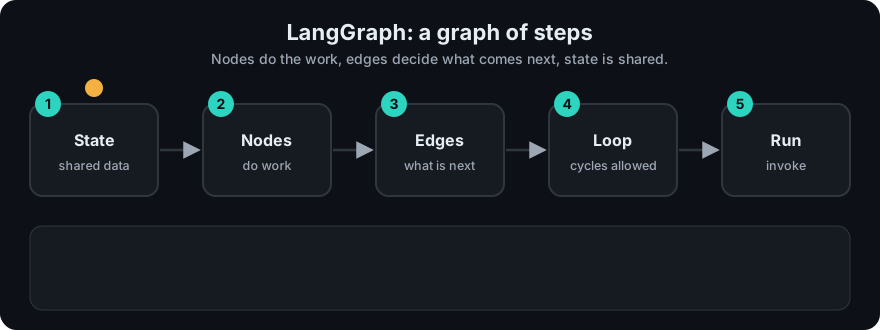
It plays on a loop. Read the caption in the box, one step at a time. Want to go at your own pace? Step through it with Previous and Next.
How it works
- Define the state shape.
- Add nodes (functions) and edges.
- Compile the graph.
- Invoke with an initial state. The runtime runs a node, merges its updates into state, follows the edge, and repeats until END.
flowchart LR
    S((START)) --> A[agent: call model]
    A -->|tool call requested| T[tools: run function]
    T --> A
    A -->|final answer| E((END))
Mapping to earlier phases: the agent loop from Phase 4 is this exact graph: model node, tool node, and a conditional edge that checks "did the model ask for a tool?". Memory (Phase 4) maps to state plus a checkpointer.
Worked example
This trace comes from the repo's offline demo (fw_mini_graph.py). It is a "write, then review" loop. The write node adds the word word to a draft. The review node marks ok as true once the draft has at least 3 words. The router goes to END if ok is true, else back to write. I added print lines and ran it to get these real values:
| # | Node runs | Update returned | Router decision |
|---|---|---|---|
| 1 | write | draft = 'word ' | (fixed edge to review) |
| 2 | review | ok = False (1 word) | back to write |
| 3 | write | draft = 'word word ' | (fixed edge to review) |
| 4 | review | ok = False (2 words) | back to write |
| 5 | write | draft = 'word word word ' | (fixed edge to review) |
| 6 | review | ok = True (3 words) | END |
The final state is {'draft': 'word word word ', 'ok': True}. The demo also records the visited nodes as ['write', 'review', 'write', 'review', 'write', 'review']. Notice that nodes never call each other. They only return updates, and the runner merges them into the shared state. A real LangGraph app has the same shape, but check the current docs for exact imports.
Code example
From scratch, using this repo's fw_mini_graph.py:
from fw_mini_graph import MiniGraph, END

g = MiniGraph()
g.add_node("write", lambda s: {"draft": s.get("draft", "") + "word "})
g.add_node("review", lambda s: {"ok": len(s["draft"].split()) >= 3})
g.set_entry("write").add_edge("write", "review")
g.add_conditional_edge("review", lambda s: END if s["ok"] else "write")

print(g.run({})["draft"])   # word word word
In real projects (pip install langgraph):
from typing import TypedDict
from langgraph.graph import StateGraph, START, END

class State(TypedDict):
    text: str

def shout(state: State) -> dict:
    return {"text": state["text"].upper()}

builder = StateGraph(State)
builder.add_node("shout", shout)
builder.add_edge(START, "shout")
builder.add_edge("shout", END)
graph = builder.compile()
print(graph.invoke({"text": "hello"}))   # {'text': 'HELLO'}
Conditional routing uses add_conditional_edges; see the docs for its exact form.
When to use it / when not to
- Use it for agents with branches, loops, retries, approval steps or several cooperating agents.
- Use it when you need to save and resume state.
- Skip it for a straight-line pipeline. A function that calls three other functions is enough.
- Skip it if you cannot yet draw your workflow on paper. Draw first.
Common mistakes
- Forgetting a loop limit, so a bad router cycles forever (the mini runner has
max_stepsfor this reason). - Putting too much into state, making it hard to inspect.
- Mutating state in place instead of returning updates.
- Using a graph where a simple
ifwould do. - Mixing up a conditional edge with a node. The router only chooses where to go next. It does not do the work.
Recap
If you remember only three things:
- LangGraph describes a workflow as nodes (steps) joined by edges (what runs next), with one shared state passed along.
- Use it when you need branches, loops, retries, approval steps, or saving and resuming state.
- If you cannot draw your workflow on paper yet, draw it first. A straight line of three functions needs no graph.
Interview questions
- Why a graph instead of a while loop? <details><summary>Answer</summary>Control flow becomes explicit data. You can visualize it, add branches, checkpoint state and pause for a human without tangled code.</details>
- What does a checkpointer give you? <details><summary>Answer</summary>Saved state after each step: conversation memory across turns, resuming after failure, and human-in-the-loop interrupts.</details>
- What is a conditional edge? <details><summary>Answer</summary>An edge whose destination is chosen by a function of the current state, such as "if the model requested a tool, go to the tools node".</details>
Go deeper
- https://langchain-ai.github.io/langgraph/
Prev: LangChain · Next: LlamaIndex · Back to phase: Phase 5