Tool Calling
On this page
Level: Beginner · Reading time: 8 min · Phase: 4 · Agentic AI
In one line: Tool calling is how an LLM asks your program to run a function for it, by outputting the tool's name and arguments in a structured format.
Before you start: What is an AI Agent?. You should know that an agent is an LLM in a loop, and that your code (not the model) runs the tools.
Explain it like I'm new
Think of a manager on the phone who can't touch a computer. They say, "Look up order 1234 and tell me the status." An assistant at a desk does the lookup and reads back the result. The manager is the LLM; the assistant is your code; the computer system is the tool.
LLMs on their own can only produce text. They can't check today's weather or read your database. They also can't do exact math reliably. Tools fix that. You describe each tool to the model:
- a name (
get_weather), - a description (when to use it),
- an input schema in JSON Schema (a standard way to describe what fields a JSON object has and their types).
Words to know:
- JSON: a plain-text format for data, like
{"city": "Pune"}. - Argument: one input value you give a function, such as
city. - Tool call: the model's request to run a tool with certain arguments. It is only a request.
- Tool result: the output your code sends back after running the tool.
- SDK (software development kit): a code library that wraps an API so you can call it from Python.
The model reads these descriptions and, when useful, replies with a tool call instead of plain text. Your code runs the function and sends back a tool result.
Watch it
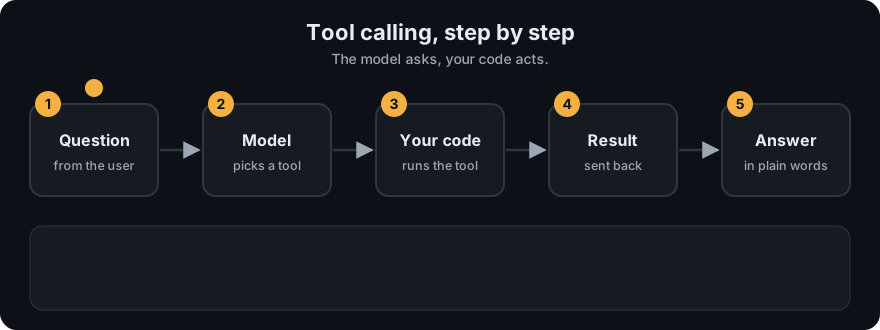
It plays on a loop. Read the caption in the box, one step at a time. Want to go at your own pace? Step through it with Previous and Next.
How it works
Using the Anthropic Messages API as the example (other providers are similar):
- You send
tools=[...]with each tool'sname,description, andinput_schema. - The model replies with a content block of type
tool_usecontaining anid,name, andinput(the arguments). The response'sstop_reasonis"tool_use". - Your code looks up the function by name, validates
input, and runs it. - You send a new
usermessage with atool_resultblock that has the sametool_use_idand the output ascontent. - The model reads the result and either calls another tool or writes the final answer.
sequenceDiagram
    participant App as Your code
    participant LLM
    participant Tool as get_weather()
    App->>LLM: user question + tool definitions
    LLM-->>App: tool_use {name: get_weather, input: {city: "Pune"}}
    App->>Tool: get_weather(city="Pune")
    Tool-->>App: "31°C, clear"
    App->>LLM: tool_result {tool_use_id, content: "31°C, clear"}
    LLM-->>App: "It's 31°C and clear in Pune."
Worked example
Question: "What's the weather in Pune?" Follow one round trip (the same steps as the diagram below):
- You send the question plus the
get_weatherdefinition shown further down. - The model replies with a tool call: name
get_weather, input{"city": "Pune"}, and someid. It stops there, because it cannot check the weather itself. - Your code finds the function called
get_weather, checks thatcityis present, and runs it. Say it returns"31°C, clear". - You send that text back as a tool result carrying the same
id, so the model knows which request it answers. - The model reads
31°C, clearand writes the final answer: "It's 31°C and clear in Pune."
The 31°C is a made-up value for illustration. What matters is the shape: request out, result back, same id.
Tool definition example:
{
  "name": "get_weather",
  "description": "Get the current weather for a city. Use when the user asks about weather.",
  "input_schema": {
    "type": "object",
    "properties": {"city": {"type": "string", "description": "City name, e.g. Pune"}},
    "required": ["city"]
  }
}
Code example
Offline: agent.py defines tools as plain functions plus a TOOL_SPECS list in exactly this format. agent_react.py adds argument validation.
from agent_react import tool_specs, dispatch

print(tool_specs()[1]["name"], tool_specs()[1]["input_schema"]["required"])  # multiply ['a', 'b']
print(dispatch("multiply", {"a": 6, "b": 7}))     # 42
print(dispatch("multiply", {"a": "6"}))           # Error: missing required argument 'b'
In real projects (Anthropic Python SDK):
import anthropic

client = anthropic.Anthropic()
tools = [{
    "name": "get_weather",
    "description": "Get the current weather for a city.",
    "input_schema": {"type": "object", "properties": {"city": {"type": "string"}}, "required": ["city"]},
}]
messages = [{"role": "user", "content": "What's the weather in Pune?"}]
resp = client.messages.create(model="claude-sonnet-4-5", max_tokens=500, tools=tools, messages=messages)

if resp.stop_reason == "tool_use":
    call = next(b for b in resp.content if b.type == "tool_use")
    result = "31°C, clear"                      # your real function would run here
    messages += [
        {"role": "assistant", "content": resp.content},
        {"role": "user", "content": [{"type": "tool_result", "tool_use_id": call.id, "content": result}]},
    ]
    final = client.messages.create(model="claude-sonnet-4-5", max_tokens=500, tools=tools, messages=messages)
    print(final.content[0].text)
When to use it / when not to
- Use tools for fresh data (APIs, search), private data (databases), exact work (math, code execution), and actions (send, create, update).
- Don't use a tool for what the model does well alone (rewording, summarizing text already in the prompt).
- Fewer, well-described tools beat many overlapping ones. Models pick wrong tools when names and descriptions are vague.
Common mistakes
- Vague descriptions like "does stuff with data". Say what it does, when to use it, and what it returns.
- Not validating arguments. The model can send wrong types or missing fields.
- Raising exceptions instead of returning a readable error string the model can recover from.
- Forgetting to echo the
tool_use_idin the result, so the API rejects the message. - Returning huge outputs (whole web pages) that flood the context window.
Recap
If you remember only three things:
- The model never runs a tool. It outputs a name and JSON arguments, and your code runs it.
- A good tool has a clear name, a description of when to use it, and a strict input schema.
- Return errors as readable text, and always echo the
tool_use_id, so the model can recover.
Interview questions
1. What does the model actually return when it "calls a tool"? <details><summary>Answer</summary> A structured block naming the tool and giving JSON arguments (for Anthropic, a tool_use block with id, name, input). It does not run anything; your code does. </details>
2. What makes a tool easy for a model to use correctly? <details><summary>Answer</summary> A clear, distinct name; a description of what it does and when to use it; a strict input schema with described fields; and short, readable outputs and error messages. </details>
3. How should a tool report errors? <details><summary>Answer</summary> As a normal, readable tool result (Anthropic also supports an is_error flag) explaining what went wrong and how to fix it, so the model can retry with corrected arguments instead of the program crashing. </details>
Go deeper
Prev: What is an AI Agent? · Next: Function Calling · Back to phase: Phase 4