Function Calling
On this page
Level: Beginner · Reading time: 8 min · Phase: 4 · Agentic AI
In one line: Function calling is the OpenAI-style name for tool calling: the model returns a function name plus JSON arguments, and your code maps that to a real function and runs it.
Before you start: Tool Calling. You should know that the model outputs a tool name plus JSON arguments, and your code runs the tool.
Explain it like I'm new
"Tool calling" and "function calling" describe the same idea. OpenAI popularized the term function calling; Anthropic and others say tool use. Many people use the words interchangeably.
Picture a restaurant order slip. The waiter (the model) doesn't cook. They write a slip: dish: "pasta", size: "large", extras: ["cheese"]. The kitchen (your code) reads the slip, checks that the dish exists and the fields make sense, and cooks it. The slip must follow a fixed form, or the kitchen can't read it.
This page focuses on the kitchen side: turning the model's slip into a safe, correct function call. That is called dispatch.
Words to know:
- Dispatch: looking up the function the model named and calling it safely.
- Registry: a Python dict that maps tool names to functions. It is your allowed list.
- Validate: check that the arguments have the right fields and types before running anything.
- Schema: a written description of what shape the arguments must have.
- Parse: turn a JSON string into a Python dict you can use.
Watch it
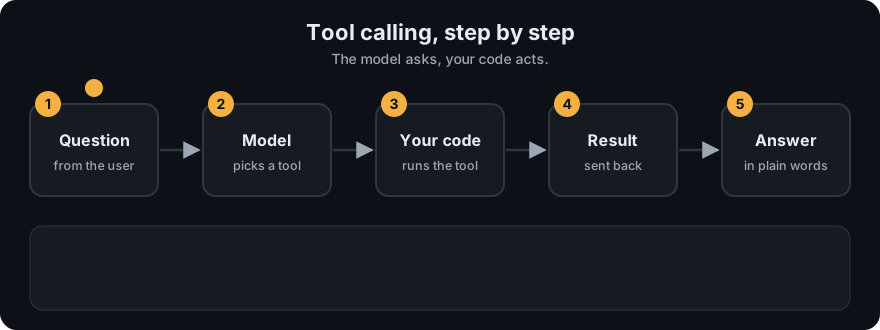
It plays on a loop. Read the caption in the box, one step at a time. Want to go at your own pace? Step through it with Previous and Next.
How it works
- Describe each function with a name, description, and a JSON Schema for its parameters.
- The model returns a call: function name and an arguments value. In the OpenAI Chat Completions API, the arguments arrive as a JSON string you must parse.
- Dispatch:
- Look up the function by name in a registry (a dict). Unknown name → readable error.
- Parse the JSON. Invalid JSON → readable error.
- Validate against the schema: required fields present, types right, no unexpected fields.
- Call the function. Catch exceptions and turn them into error strings.
- Send the result back, linked by the call's ID (
tool_call_idin OpenAI,tool_use_idin Anthropic).
model output                          your dispatcher
------------------------------        ---------------------------------------
name: "multiply"                ->    registry["multiply"]       found?
arguments: '{"a": 6, "b": 7}'   ->    json.loads(...)            valid JSON?
                                      validate(schema, args)     types ok?
                                      multiply(**args)  -> "42"  caught errors?
Worked example
Here is the dispatcher from the code example below, given four different slips. These are real outputs (run dispatch from agent_react.py):
| Model's slip (name, arguments) | What dispatch does | Result |
|---|---|---|
multiply, {"a": 6, "b": 7} | name found, both fields present, both numbers, runs 6 * 7 | 42 |
multiply, {"a": 6, "c": 7} | b is required but missing | Error: missing required argument 'b' |
multiply, {"a": "6", "b": 7} | a is a string, not a number | Error: argument 'a' must be number |
divide, {"a": 6, "b": 7} | divide is not in the registry | Error: unknown tool 'divide'. Available: lookup, multiply |
Only the first slip runs the function. The other three become short error messages that go back to the model, which can then fix its call and try again. Nothing crashes. (The last message lists the tools in the full file, so it shows two names. The short code below prints a slightly shorter message.)
Strict mode / structured outputs. Some APIs can constrain the model so its arguments always match your schema (for example OpenAI's strict: true for function definitions). This reduces bad calls. You should still validate, because values can be valid JSON and still wrong for your business rules (a negative quantity, or an ID that doesn't exist).
Parallel calls. Models can return several function calls in one turn. Run independent ones (concurrently if you like), and return one result per call ID.
Code example
From agent_react.py: a registry, a tiny JSON Schema validator, and a dispatcher that never crashes.
TOOLS = {
    "multiply": {
        "fn": lambda a, b: str(a * b),
        "schema": {"type": "object",
                   "properties": {"a": {"type": "number"}, "b": {"type": "number"}},
                   "required": ["a", "b"], "additionalProperties": False},
    },
}

def validate_args(schema, args):
    for key in schema.get("required", []):
        if key not in args:
            return f"missing required argument '{key}'"
    for key, value in args.items():
        if key not in schema["properties"]:
            return f"unexpected argument '{key}'"
        if schema["properties"][key]["type"] == "number" and (
                isinstance(value, bool) or not isinstance(value, (int, float))):
            return f"argument '{key}' must be number"
    return None

def dispatch(name, args):
    tool = TOOLS.get(name)
    if tool is None:
        return f"Error: unknown tool '{name}'"
    problem = validate_args(tool["schema"], args)
    if problem:
        return f"Error: {problem}"
    try:
        return tool["fn"](**args)
    except Exception as e:
        return f"Error: {e}"

print(dispatch("multiply", {"a": 6, "b": 7}))    # 42
print(dispatch("multiply", {"a": 6, "c": 7}))    # Error: missing required argument 'b'
In real projects (OpenAI Python SDK, Chat Completions):
import json
from openai import OpenAI

client = OpenAI()
tools = [{
    "type": "function",
    "function": {
        "name": "multiply",
        "description": "Multiply two numbers.",
        "parameters": {"type": "object",
                       "properties": {"a": {"type": "number"}, "b": {"type": "number"}},
                       "required": ["a", "b"]},
    },
}]
messages = [{"role": "user", "content": "What is 6 times 7?"}]
resp = client.chat.completions.create(model="gpt-4o-mini", messages=messages, tools=tools)
msg = resp.choices[0].message
if msg.tool_calls:
    messages.append(msg)
    for call in msg.tool_calls:
        args = json.loads(call.function.arguments)      # arguments is a JSON string
        messages.append({"role": "tool", "tool_call_id": call.id, "content": dispatch(call.function.name, args)})
    print(client.chat.completions.create(model="gpt-4o-mini", messages=messages, tools=tools).choices[0].message.content)
When to use it / when not to
- Use whenever the model must trigger code or return data in a fixed shape (function calling is also a reliable way to get structured JSON out).
- Don't expose raw, powerful functions (
run_sql(query),shell(cmd)) directly. Wrap them in narrow functions (get_order(order_id)).
| Provider term | Definition field | Result message |
|---|---|---|
| Anthropic "tool use" | input_schema | tool_result block with tool_use_id |
| OpenAI "function calling" | parameters | role: "tool" message with tool_call_id |
Common mistakes
- Calling
eval()on the arguments or on model text. Never execute model output as code without a sandbox. - Forgetting that OpenAI's
argumentsis a string, not a dict. - Thinking "function calling" means the model calls your Python function directly. It only writes the request.
- Skipping validation because "the schema is strict".
- Letting exceptions crash the loop instead of returning them to the model.
Recap
If you remember only three things:
- Function calling and tool calling are the same idea with different provider names.
- Dispatch means: find the name in a registry, parse the JSON, validate it, run it, and catch errors.
- Strict schemas help, but you still check business rules and permissions in your own code.
Interview questions
1. Is function calling different from tool calling? <details><summary>Answer</summary> Not in concept. Both mean the model emits a structured request (name + JSON arguments) that your code executes. The naming and message formats differ by provider. </details>
2. What should a dispatcher check before running a function? <details><summary>Answer</summary> That the function name exists in an allowlist/registry, the arguments parse as JSON, they match the schema (required fields, types, no extras), and they pass business rules and permissions. Then run it inside error handling. </details>
3. If strict schema mode guarantees valid JSON, why validate again? <details><summary>Answer</summary> Schema-valid values can still be wrong or dangerous: nonexistent IDs, out-of-range amounts, or actions the user isn't allowed to perform. Business and permission checks must live in your code. </details>
Go deeper
Prev: Tool Calling · Next: ReAct Pattern · Back to phase: Phase 4