MCP Client
On this page
Level: Intermediate · Reading time: 11 min · Phase: 6 — MCP
In one line: An MCP client is the part of an AI app that connects to one MCP server, negotiates capabilities and sends its requests.
Before you start: MCP server. You should know what a server offers and the order of the handshake.
Explain it like I'm new
Picture a phone. The phone app is the host. Inside it, each contact connection is a client. You do not talk to the cell tower yourself; the client handles the call setup.
The host (Claude Desktop, an IDE, your agent) contains the LLM and the user interface. For each server, it creates one client. The client's job is plumbing: open the transport, do the handshake, send requests, match replies to requests by id, and hand results back. The host's job is judgment: which tools to show the model and whether the user approves a call.
Words to know:
- Host: the app the user sees (a chat app or editor). It contains one client per server.
- Client: the part of the host that talks to one server.
- inputSchema: a description of the arguments a tool accepts, written as JSON Schema.
- Untrusted text: a tool result is text from someone else. Never treat it as instructions.
Watch it
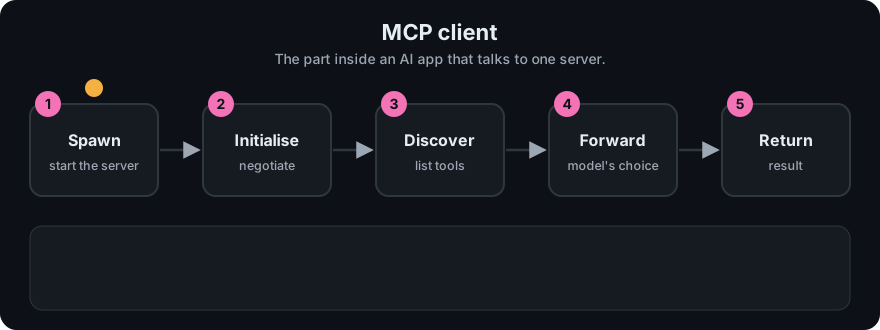
It plays on a loop. Read the caption in the box, one step at a time. Want to go at your own pace? Step through it with Previous and Next.
How it works
- Read config. The host reads a list of servers (see the config below).
- Launch or connect. For stdio, spawn the process. For Streamable HTTP, connect to the URL.
- Initialize. Send
initializewith your protocol version and your capabilities, thennotifications/initialized. - Discover. Call
tools/list,resources/list,prompts/listfor what the server declared. - Give tools to the model. Convert each MCP tool (
name,description,inputSchema) into the model API's tool format. - Route calls. When the model asks for a tool, ask the user to approve if needed, send
tools/call, and feed the result back.
flowchart TD
  A[Model asks to call tool] --> B{User approves?}
  B -- no --> X[Return refusal to model]
  B -- yes --> C[Client sends tools/call]
  C --> D[Server runs tool]
  D --> E[Result: content + isError]
  E --> F[Treat as untrusted text, give to model]
Claude Desktop config
Claude Desktop reads claude_desktop_config.json. Each entry under mcpServers has a command and args, and optionally env. Use absolute paths, then restart the app:
{
  "mcpServers": {
    "hello": {
      "command": "node",
      "args": ["/absolute/path/to/06-mcp/code/hello-mcp-server/dist/index.js"]
    }
  }
}
Build first: cd 06-mcp/code/hello-mcp-server && npm ci && npm run build. The config file location depends on your OS; see the docs.
Worked example
One full round trip, from the model asking for a tool to the answer coming back.
- The client starts the server, sends
initializeand thennotifications/initialized. - The client sends
tools/list. It getsadd_numberswith itsinputSchemaand converts it into the format your model API expects. - The user asks: "What is 2 plus 40?" The model replies with a request to call
add_numberswitha= 2 andb= 40. - If approval is on, the client shows the call to the user. The user says yes.
- The client sends
tools/call. The server runs the tool and returns the text42. - The client hands
42back to the model as untrusted text, and the model writes: "2 plus 40 is 42."
The model never talks to the server directly. The client sits in the middle, so it is the place to ask for approval and to check results.
Code example
The in-process toy client from code/mcp_mini_jsonrpc.py:
from mcp_mini_jsonrpc import MiniMcpClient, MiniMcpServer

client = MiniMcpClient(MiniMcpServer())
client.connect()                       # initialize + notifications/initialized
print([t["name"] for t in client.list_tools()])
result = client.call_tool("add_numbers", {"a": 2, "b": 40})
print(result["content"][0]["text"])    # 42
Each call builds {"jsonrpc": "2.0", "id": N, "method": ..., "params": ...} and increments id.
In real projects (TypeScript SDK, same package as the hello server; check the SDK docs for your version):
import { Client } from "@modelcontextprotocol/sdk/client/index.js";
import { StdioClientTransport } from "@modelcontextprotocol/sdk/client/stdio.js";

const client = new Client({ name: "my-host", version: "1.0.0" });
await client.connect(new StdioClientTransport({
  command: "node",
  args: ["dist/index.js"],
}));
const { tools } = await client.listTools();
const result = await client.callTool({ name: "add_numbers", arguments: { a: 2, b: 40 } });
When to use it / when not to
- Write your own client when building an agent or host that should use existing MCP servers.
- Do not write a client just to call one function you own. Call it directly.
- Show tool names and arguments to the user before running risky calls.
Common mistakes
- Auto-approving every tool call.
- Connecting to many servers and sending the model hundreds of tools. Tool choice gets worse; filter them.
- Ignoring
isErrorin the result. - Passing secrets to servers you do not trust.
- Letting the model call a tool without any approval step for actions that change things. Reading is lower risk than writing or deleting.
- Treating a tool result as instructions. A result can contain text that tries to steer the model.
Recap
If you remember only three things:
- The client connects, handshakes, lists what the server offers, and passes tools to the model.
- The model asks, the client sends
tools/call, and the client feeds the result back. - The client is the control point: ask for approval and treat results as untrusted text.
Interview questions
- Host vs client?
<details><summary>Answer</summary>The host is the AI app. It contains one client per server. The client manages that one connection.</details>
- How are replies matched to requests?
<details><summary>Answer</summary>By the JSON-RPC id. Notifications have no id and get no reply.</details>
- Why keep a human in the loop?
<details><summary>Answer</summary>Tools can change real systems, and the model can be tricked by injected text. Approval is a safety check.</details>
Go deeper
Prev: 02-mcp-server.md · Next: 04-mcp-tools.md · Back to phase: Phase 6