MCP Tools
On this page
Level: Intermediate · Reading time: 12 min · Phase: 6 — MCP
In one line: Tools are actions a server exposes, each with a name, a description and a JSON Schema for its input, and the model decides when to call them.
Before you start: MCP client and Tool calling. You should know that the model asks the app to run a function.
Explain it like I'm new
A tool is a button on a remote control. The label (description) tells the model what the button does. The model presses it by sending a name and arguments. A tool is model-controlled: the LLM chooses to use it, usually with the user's approval.
JSON Schema is a standard way to describe the shape of JSON: "an object with a number a and a number b, both required". The server publishes one per tool so the model knows what to send.
Words to know:
- Tool: an action the server can run, such as adding numbers or saving a note.
- JSON Schema: a standard way to describe the shape of data, such as which fields are required and their types.
- Protocol error: the request itself was wrong, such as an unknown tool name. It comes back as a JSON-RPC
error. - Tool error: the tool ran but failed. It comes back as a normal result with
isErrorset to true.
Watch it
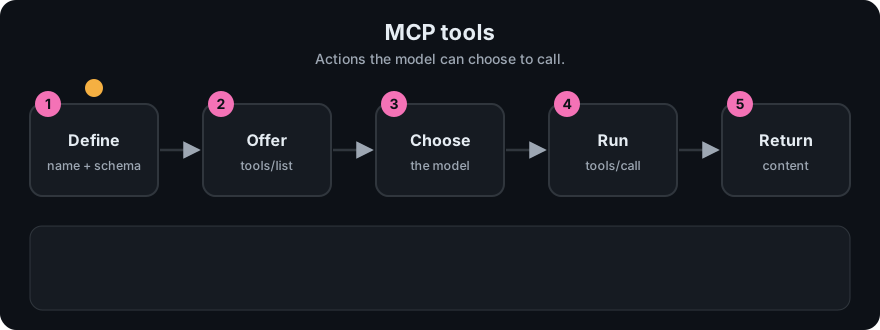
It plays on a loop. Read the caption in the box, one step at a time. Want to go at your own pace? Step through it with Previous and Next.
How it works
- Client sends
tools/list. - Server replies with tools:
name,description,inputSchema(and optionaltitle,annotations). - The model picks a tool. Client sends
tools/callwithnameandarguments. - Server validates arguments, runs the tool and replies with
content(a list of items, e.g.{"type":"text","text":"42"}) andisError.
Request and reply (shapes from the spec; the mini toy produces them):
{"jsonrpc":"2.0","id":2,"method":"tools/call",
 "params":{"name":"add_numbers","arguments":{"a":2,"b":40}}}

{"jsonrpc":"2.0","id":2,
 "result":{"content":[{"type":"text","text":"42"}],"isError":false}}
Two kinds of failure. An unknown tool or bad arguments is a protocol error: a JSON-RPC error object (code -32602, "invalid params"). A tool that runs but fails (a file is missing) should return a normal result with isError: true, so the model can read the message and recover. Check the tools page of the spec for current guidance.
Annotations are hints such as readOnlyHint. They help clients decide how to ask for approval. Treat them as hints, not guarantees, from servers you do not trust.
sequenceDiagram
  participant M as Model
  participant H as Host/Client
  participant S as Server
  H->>S: tools/list
  S-->>H: tools + schemas
  M->>H: call add_numbers(2, 40)
  H->>S: tools/call
  S-->>H: content "42", isError false
  H->>M: result text
Worked example
Three calls to the same toy server, and what each one returns.
tools/callwithadd_numbers,a= 2,b= 40. Result:contentholds the text42andisErrorisfalse.tools/callwith a tool calleddelete_everything. The server has no such tool, so it replies with a JSON-RPCerror(code -32602). That is a protocol error.- A tool that exists but cannot do its job, for example reading a missing file, should reply with a normal result whose
isErroristrueand a message the model can read. The model can then try something else.
The difference matters: a protocol error says "your request was wrong", while a tool error says "the request was fine, the work failed".
Code example
From code/hello-mcp-server/src/index.ts (real, builds in CI):
server.registerTool(
  "word_count",
  {
    title: "Word count",
    description: "Count the words in a piece of text.",
    inputSchema: { text: z.string().min(1) },
    annotations: { readOnlyHint: true },
  },
  async ({ text }) => ({ content: [{ type: "text", text: String(text.trim().split(/\s+/).length) }] })
);
zod turns inputSchema into JSON Schema and validates input before your function runs. An empty string is rejected.
Python toy version, with the same two failure types (see code/mcp_mini_jsonrpc.py):
try:
    client.call_tool("nope", {})           # protocol error -> RpcError(-32602)
except Exception as e:
    print(e)
print(client.call_tool("add_numbers", {"a": 1, "b": "x"})["isError"])  # True
When to use it / when not to
- Use tools for actions and computed answers: search, create a ticket, run a query.
- Use a resource instead when you only expose read-only data.
- Make tools narrow.
create_note(title, body)beatsrun_sql(query). - Describe each tool in plain words. The description is the model's only guide.
Common mistakes
- Vague descriptions, so the model picks the wrong tool.
- Building shell commands or SQL from model arguments (injection risk).
- Returning huge outputs that flood the context.
- Treating tool output as trusted. It can contain instructions planted by an attacker (prompt injection).
- Marking a destructive tool read-only.
- Returning a protocol error for a failed tool run. The model needs to read the failure message, so use
isErrorwith text instead. - Making one huge tool that does everything. Several narrow tools with clear descriptions are safer and easier for the model to pick.
Recap
If you remember only three things:
- A tool has a name, a description and an input schema. The model chooses when to call it.
- Success returns
contentwithisErrorfalse. A failed run returnsisErrortrue with a readable message. - Unknown tools or bad arguments are protocol errors. Failed work is a tool error.
Interview questions
- Protocol error vs
isError?
<details><summary>Answer</summary>Protocol errors (unknown tool, bad params) use the JSON-RPC error field. Tool execution failures return a normal result with isError: true so the model can adapt.</details>
- Why are tools "model-controlled"?
<details><summary>Answer</summary>The LLM decides when to call them based on descriptions. Hosts should still ask the user to approve.</details>
- What is the risk in tool output?
<details><summary>Answer</summary>It is untrusted text and may carry prompt injection. Do not let it grant itself more permissions.</details>
Go deeper
Prev: 03-mcp-client.md · Next: 05-mcp-resources.md · Back to phase: Phase 6