MCP Prompts
On this page
Level: Intermediate · Reading time: 8 min · Phase: 6 — MCP
In one line: Prompts are reusable message templates a server offers, which the user picks explicitly, much like slash commands.
Before you start: MCP resources. You should know who chooses a resource, so you can compare with who chooses a prompt.
Explain it like I'm new
A prompt is a form letter with blanks. You choose "complaint letter", fill in the name and date, and get a finished message. In MCP, the server ships the template. The user selects it (for example by typing /summarize). That makes prompts user-controlled: neither the model nor the app picks them silently.
Why not just paste text? Because a good server author knows the best wording for their tools. A "code review" prompt can set up the right instructions and even embed a resource.
Words to know:
- Prompt: a reusable message template a server offers, like a slash command.
- Argument: a blank in the template that the user fills in, such as
text. - Message: one item with a
role(such as user) and somecontent.
Watch it
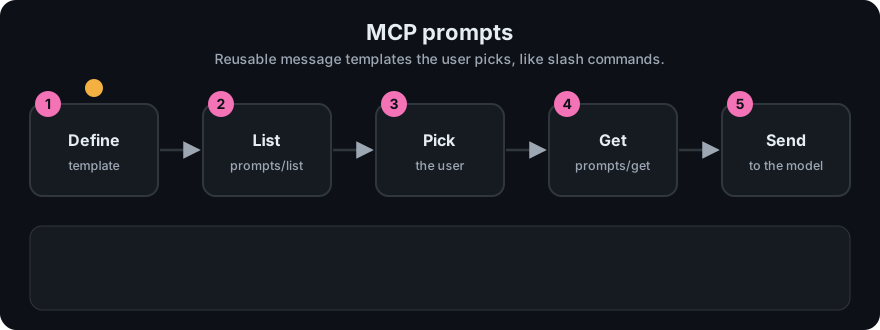
It plays on a loop. Read the caption in the box, one step at a time. Want to go at your own pace? Step through it with Previous and Next.
How it works
- Server declares the
promptscapability. - Client sends
prompts/list. Each prompt has aname,descriptionandarguments(each with a name and whether it is required). - The user selects one and fills the arguments.
- Client sends
prompts/getwithnameandarguments. - Server returns
messages: a list of{role, content}items that the host inserts into the conversation.
{"jsonrpc":"2.0","id":4,"method":"prompts/get",
 "params":{"name":"summarize","arguments":{"text":"MCP is a protocol."}}}

{"jsonrpc":"2.0","id":4,"result":{
  "description":"Ask the model to summarize some text.",
  "messages":[{"role":"user","content":{"type":"text","text":"Summarize this:\nMCP is a protocol."}}]}}
Content can also be an image, audio or an embedded resource. Check the prompts page of the spec for the full list.
flowchart LR
  U[User picks /summarize] --> G[prompts/get + arguments]
  G --> M[Server returns messages]
  M --> L[Host sends them to the LLM]
All three primitives
| Primitive | Controlled by | Typical method | Example |
|---|---|---|---|
| Tool | Model | tools/call | add_numbers |
| Resource | Application | resources/read | notes://welcome |
| Prompt | User | prompts/get | /summarize |
Worked example
Using the toy server's summarize prompt.
prompts/listshows one prompt namedsummarize. It needs one argument calledtext.- The user picks it, like typing a slash command, and pastes
MCP is a protocol. - The client sends
prompts/getwith the name and that argument. - The server fills the template and returns one
usermessage:Summarize this:thenMCP is a protocol. - The host places that message into the conversation and sends it to the model.
The user picked the prompt. The model did not.
Code example
Offline toy (code/mcp_mini_jsonrpc.py):
print(client.list_prompts()[0]["name"])        # summarize
got = client.get_prompt("summarize", {"text": "MCP is a protocol."})
print(got["messages"][0]["content"]["text"])
A missing required argument produces a JSON-RPC error (-32602).
In real projects (TypeScript SDK, not used in the hello server; check the SDK docs for your version):
import { z } from "zod";

server.registerPrompt(
  "summarize",
  { title: "Summarize", description: "Summarize some text.", argsSchema: { text: z.string() } },
  ({ text }) => ({
    messages: [{ role: "user", content: { type: "text", text: `Summarize this:\n${text}` } }],
  })
);
Python (mcp 2.x MCPServer, called FastMCP in 1.x):
@mcp.prompt()
def summarize(text: str) -> str:
    return f"Summarize this:\n{text}"
When to use it / when not to
- Use prompts for repeatable workflows the user triggers: review code, draft a note, explain an error.
- Do not use a prompt to run actions. Use a tool.
- Keep arguments few and clear.
- Remember that prompt text goes to the model. Never put user-supplied strings in without care (injection).
Common mistakes
- Confusing prompts with system prompts. MCP prompts are templates the user invokes.
- Hard-coding secrets into templates.
- Assuming the host shows prompts. Some clients do not support them yet.
- Forgetting to validate arguments.
- Thinking prompts are system prompts. They are messages the user chooses to insert, not hidden instructions.
- Putting secrets in prompt templates. Anyone who can list prompts can read them.
Recap
If you remember only three things:
- A prompt is a template of messages the server offers.
- The user picks a prompt and fills its arguments. The model does not.
- Tools are model-chosen, resources are app-chosen, prompts are user-chosen.
Interview questions
- Who controls prompts?
<details><summary>Answer</summary>The user. They choose a prompt explicitly, like a slash command.</details>
- What does
prompts/getreturn?
<details><summary>Answer</summary>A list of messages (role and content) ready to put into the conversation, plus an optional description.</details>
- Prompt vs tool?
<details><summary>Answer</summary>A prompt produces messages for the model. A tool runs an action and returns a result.</details>
Go deeper
Prev: 05-mcp-resources.md · Next: 07-build-a-custom-mcp-server.md · Back to phase: Phase 6