Model Context Protocol
On this page
Level: Beginner · Reading time: 11 min · Phase: 6 — MCP
In one line: The Model Context Protocol (MCP) is an open standard that lets any AI app talk to any tool or data source through one shared message format.
Before you start: Tool calling. You should already know that an LLM can ask an app to run a function for it.
Explain it like I'm new
Think of a USB-C port. Before it, every device had its own charger. After it, one cable fits many devices.
MCP plays that role for AI apps. Before MCP, if you wanted a chat app to read your files, you wrote custom code. If you wanted a second app to do the same, you wrote it again. With MCP, you write one server that exposes your files. Any MCP-aware client (such as Claude Desktop or an IDE) can use it.
Three words you need:
- Host: the AI app the user sees (Claude Desktop, an IDE, your own agent).
- Client: the connector inside the host. Each client holds a 1:1 connection to one server.
- Server: a small program that exposes capabilities.
A server can offer three kinds of things (called primitives): tools (actions), resources (data to read) and prompts (reusable templates).
Words to know:
- JSON-RPC: a tiny message format. A request names a
methodandparams. The reply carries the sameid. - Transport: the pipe the messages travel through, such as stdio (a local program's input and output) or HTTP.
- Capability: a feature a side says it supports, such as
tools. - Handshake: the first exchange where both sides say hello and agree on what they support.
Watch it
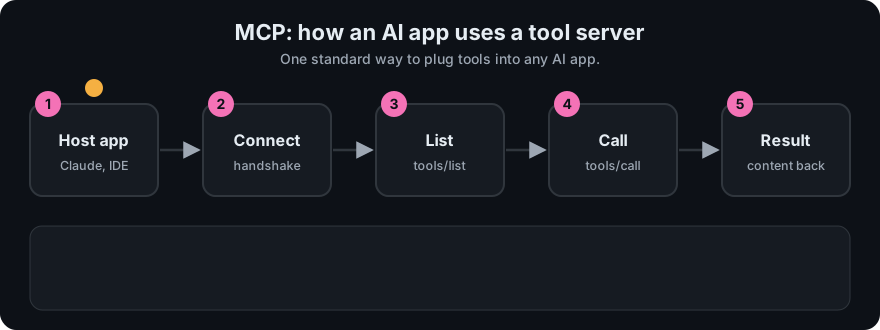
It plays on a loop. Read the caption in the box, one step at a time. Want to go at your own pace? Step through it with Previous and Next.
How it works
- The host starts a client for each configured server.
- The client opens a transport (stdio or Streamable HTTP).
- Client and server do the initialize handshake and agree on a protocol version and capabilities.
- The client lists what the server offers (
tools/list,resources/list,prompts/list). - The model decides to use a tool; the host asks the user to approve; the client sends
tools/call. - The result goes back into the model's context.
All messages are JSON-RPC 2.0: a simple format where a request has jsonrpc, id, method, params, and the reply has the same id with either result or error.
flowchart LR
  U[User] --> H[Host app + LLM]
  H --> C1[MCP client 1]
  H --> C2[MCP client 2]
  C1 <-->|stdio| S1[Server: files]
  C2 <-->|Streamable HTTP| S2[Server: remote API]
Who controls what
| Primitive | Controlled by | Meaning |
|---|---|---|
| Tools | The model | The LLM decides when to call them |
| Resources | The application | The app decides what data to attach |
| Prompts | The user | The user picks them (like slash commands) |
Worked example
Let us trace one tiny session with the toy in code/mcp_mini_jsonrpc.py. The client wants to add 2 and 40 using a tool. Every line below is a real message printed by the toy (>> is client to server, << is the reply).
Step 1. Say hello.
>> {"jsonrpc": "2.0", "id": 1, "method": "initialize", "params": {"protocolVersion": "2025-06-18", "capabilities": {}, "clientInfo": {"name": "mini-client", "version": "0.1.0"}}}
<< {"jsonrpc": "2.0", "id": 1, "result": {"protocolVersion": "2025-06-18", "capabilities": {"tools": {"listChanged": false}, "resources": {}, "prompts": {}}, "serverInfo": {"name": "mini-mcp", "version": "0.1.0"}}}
The reply has id 1, so we know it answers request 1. The server says it supports tools, resources and prompts.
Step 2. Confirm. The client sends a notification. It has no id, so there is no reply.
>> {"jsonrpc": "2.0", "method": "notifications/initialized"}
<< (nothing)
Step 3. Use a tool. The client sends tools/call (request id 3 in the full demo, after a tools/list as id 2).
>> {"jsonrpc": "2.0", "id": 3, "method": "tools/call", "params": {"name": "add_numbers", "arguments": {"a": 2, "b": 40}}}
<< {"jsonrpc": "2.0", "id": 3, "result": {"content": [{"type": "text", "text": "42"}], "isError": false}}
The text 42 goes back to the model. That is all MCP is: a few small JSON messages in a fixed order.
Code example
The runnable toy in code/mcp_mini_jsonrpc.py shows the real message shapes without a network. Here is the first request and reply:
import json
request = {"jsonrpc": "2.0", "id": 1, "method": "initialize",
           "params": {"protocolVersion": "2025-06-18", "capabilities": {},
                      "clientInfo": {"name": "demo", "version": "0.1"}}}
print(json.dumps(request))
# The server answers with the same id and a result:
# {"jsonrpc":"2.0","id":1,"result":{"protocolVersion":"2025-06-18",
#   "capabilities":{"tools":{}},"serverInfo":{"name":"hello","version":"1.0.0"}}}
The version string changes over time. Check the current spec.
When to use it / when not to
| Plain function calling | MCP | A2A | |
|---|---|---|---|
| What it is | Model API feature: you pass tool schemas, the model returns a call | Protocol between an AI app and tool/data servers | Protocol between agents (agent-to-agent) |
| Who runs the tool | Your own app code | A separate server process | Another agent |
| Reuse across apps | Low: tied to your code | High: any MCP client | High: any A2A agent |
| Best for | One app, a few tools | Shared tools, data, many hosts | Agents that delegate to other agents |
- Use MCP when several apps should share tools, or when you want ready-made servers.
- Skip it when you have one app and two simple functions. Plain function calling is less work.
Common mistakes
- Thinking MCP replaces function calling. Hosts usually use function calling inside, then route calls to MCP servers.
- Mixing up host, client and server.
- Trusting any server you find online. A server runs code with your permissions.
- Assuming A2A and MCP compete. MCP connects agents to tools; A2A connects agents to agents.
- Mixing up the three primitives. A tool is an action the model runs. A resource is data the app attaches. A prompt is a template the user picks.
Recap
If you remember only three things:
- MCP is one shared plug between AI apps (clients) and tools or data (servers).
- Everything is JSON-RPC messages: requests with an
id, replies with the sameid. - A server offers three primitives: tools (model picks), resources (app picks), prompts (user picks).
Interview questions
- What problem does MCP solve?
<details><summary>Answer</summary>It removes the need for custom integration code for every app and tool pair. One server works with any MCP client.</details>
- Name the three primitives and who controls each.
<details><summary>Answer</summary>Tools (model-controlled), resources (application-controlled), prompts (user-controlled).</details>
- What message format does MCP use?
<details><summary>Answer</summary>JSON-RPC 2.0, over stdio or Streamable HTTP.</details>
Go deeper
Prev: Phase 5 · Next: 02-mcp-server.md · Back to phase: Phase 6