SQL RAG
On this page
Level: Advanced · Reading time: 9 min · Phase: 2 — Advanced RAG
In one line: SQL RAG (also called text-to-SQL) lets an LLM turn a question into a SQL query, runs it on your database, and uses the result rows as context for the answer.
Before you start: What is RAG. Some basic SQL (SELECT, WHERE, COUNT) helps but is not required; each query below is explained.
Explain it like I'm new
"How many orders did we ship to Germany last month?" No document contains that number. It lives in a database, and you get it by counting. Searching text for similar sentences cannot add up rows.
Structured data (tables with columns and types) needs a different kind of retrieval: a query. SQL RAG asks an LLM to write that query. The LLM sees the schema (table names, columns, types, a few example rows), writes SQL, your code runs it, and the LLM turns the result into a sentence.
This is powerful and risky. You are letting a model write code that runs against real data. Safety is not optional: read-only access, validation and limits.
Words to know:
- SQL: the language used to ask a database questions, for example
SELECT COUNT(*) FROM orders. - Schema: the list of tables and columns in a database, with their types.
- Query: one SQL request that returns rows.
- Read-only user: a database login that can look at data but cannot change or delete it.
LIMIT: a SQL clause that caps how many rows come back.
Watch it
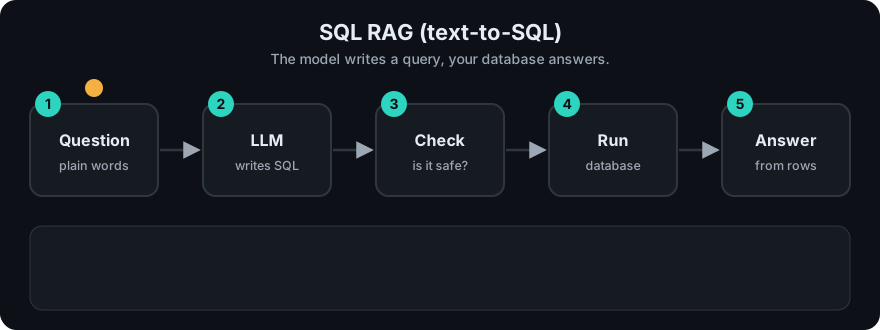
It plays on a loop. Read the caption in the box, one step at a time. Want to go at your own pace? Step through it with Previous and Next.
How it works
- Schema context: give the LLM the relevant tables and columns (for big databases, retrieve only relevant tables first).
- Generate SQL from the question. Few-shot examples of question → SQL help a lot.
- Validate: single
SELECTstatement only, allowed tables only, add aLIMIT. - Execute with a read-only database user and a timeout.
- On error, send the error message back to the LLM to fix the query (cap retries, e.g. 2).
- Answer from the rows, and show the SQL to the user for transparency.
Worked example
The database has three orders: two shipped to Germany (DE, amounts 120 and 80) and one to France (FR, 50). The question is "How many orders did we ship to Germany in September 2026?"
- Schema context: the LLM is shown
orders(id, country, amount, shipped_on). - Generate SQL: it writes
SELECT COUNT(*), SUM(amount) FROM orders WHERE country = 'DE' AND shipped_on LIKE '2026-09-%'. In plain words: count the rows and add up the amounts where the country is DE and the date starts with 2026-09. - Validate: it is one
SELECT, no forbidden words, and only theorderstable. There is noLIMIT, so the code addsLIMIT 100. - Execute: rows 1 and 2 match. The result is
[(2, 200.0)]: 2 orders, 200 total. - Answer: the LLM says "2 orders, worth 200 in total" and shows the SQL so a person can check it.
If step 3 had seen DROP TABLE orders, it would have raised an error and nothing would have run.
flowchart LR
    Q[Question] --> L1[LLM + schema] --> SQL[SELECT ...]
    SQL --> V{Validate:<br/>SELECT only,<br/>allowed tables,<br/>LIMIT}
    V -->|ok| DB[(Read-only DB)]
    V -->|reject| L1
    DB -->|rows / error| L2[LLM writes answer]
    DB -->|error| L1
Code example
Stdlib only, with sqlite3 and a stubbed LLM. The important part is the guardrail.
import re
import sqlite3

conn = sqlite3.connect(":memory:")
conn.executescript("""
CREATE TABLE orders (id INTEGER, country TEXT, amount REAL, shipped_on TEXT);
INSERT INTO orders VALUES (1,'DE',120,'2026-09-03'),(2,'DE',80,'2026-09-15'),(3,'FR',50,'2026-09-20');
""")
SCHEMA = "orders(id INTEGER, country TEXT, amount REAL, shipped_on TEXT)"
ALLOWED_TABLES = {"orders"}

def fake_llm_sql(question, schema):
    # A real LLM writes this from the question + schema.
    return "SELECT COUNT(*), SUM(amount) FROM orders WHERE country = 'DE' AND shipped_on LIKE '2026-09-%'"

def validate(sql):
    s = sql.strip().rstrip(";")
    if ";" in s or not re.match(r"(?is)^\s*select\b", s):
        raise ValueError("only a single SELECT is allowed")
    if re.search(r"(?i)\b(insert|update|delete|drop|alter|attach|pragma)\b", s):
        raise ValueError("forbidden keyword")
    tables = set(re.findall(r"(?i)\b(?:from|join)\s+(\w+)", s))
    if not tables <= ALLOWED_TABLES:
        raise ValueError(f"table not allowed: {tables - ALLOWED_TABLES}")
    return s if re.search(r"(?i)\blimit\b", s) else s + " LIMIT 100"

sql = validate(fake_llm_sql("How many orders did we ship to Germany in September 2026?", SCHEMA))
rows = conn.execute(sql).fetchall()
print(sql)
print(rows)  # [(2, 200.0)]
Regex validation is a teaching aid, not a security boundary. The real protection is a read-only database user with access to only the allowed tables or views.
In real projects LangChain and LlamaIndex both ship SQL database helpers and text-to-SQL query engines that wrap SQLAlchemy connections. Check LangChain and LlamaIndex for current class names, and still enforce read-only credentials yourself.
When to use it / when not to
- Use it for counts, sums, filters, rankings and trends over structured data.
- Use it for internal analytics assistants where users know the data exists.
- Avoid it for unstructured text questions. Use normal RAG, or route between both.
- Avoid giving it write access, or direct access to tables with sensitive personal data.
| Question | Best retrieval |
|---|---|
| "What is our refund policy?" | Vector RAG over documents |
| "How many refunds last week?" | SQL RAG |
| "Why did refunds spike last week?" | Both: SQL for numbers, docs/tickets for reasons |
Common mistakes
- Running LLM SQL with a read–write user. One
DROP TABLEand you have an incident. - Sending the whole schema of a 500-table warehouse. Retrieve relevant tables first, and describe columns in plain words.
- No
LIMITor timeout, so one query scans billions of rows. - Not showing the SQL. Users and reviewers need to verify how a number was produced.
- Ambiguous columns (
status = 3). Add descriptions and allowed values to the schema prompt.
Recap
If you remember only three things:
- Counting and summing need a database query, not a similarity search, so the LLM writes SQL.
- Safety comes first: a read-only user is the real protection, and validation,
LIMITand timeouts are extra layers. - Show the generated SQL to users, and evaluate by comparing result rows, not SQL text.
Interview questions
1. How do you make text-to-SQL safe? <details><summary>Answer</summary> Read-only database user scoped to approved tables or views, single-SELECT validation, row limits and timeouts, row-level security for multi-tenant data, logging of every query, and human-visible SQL. </details>
2. The LLM keeps writing wrong joins. What helps? <details><summary>Answer</summary> Better schema context (foreign keys, column descriptions), few-shot examples of correct queries, pre-built views that hide complex joins, and an error-feedback retry loop. Evaluate with a set of question → expected-result pairs. </details>
3. How do you evaluate SQL RAG? <details><summary>Answer</summary> Execution accuracy: run the generated query and the reference query and compare result sets, rather than comparing SQL strings, because many different queries are correct. </details>
Go deeper
Prev: Multi Modal RAG · Next: API RAG · Back to phase: Phase 2