Memory
On this page
Level: Beginner · Reading time: 8 min · Phase: 4 · Agentic AI
In one line: Agent memory is everything your code stores and feeds back to the model so it can use past information, because the model itself forgets everything between calls.
Before you start: What is an AI Agent? and the context window. You should know that a model can only read a limited amount of text per call.
Explain it like I'm new
Imagine a very capable assistant with a strange condition: every time they leave the room, they forget everything. To work with them, you keep a notebook. Before each conversation, you hand them the relevant pages. These are today's chat so far, facts about the client, and notes from similar past jobs.
That is exactly how LLM memory works. The model is stateless: each API call starts fresh. Any "memory" is text (or data) your application saves and then puts back into the prompt. Memory design means deciding what to save, where, and what to load back each time. This matters because the context window (the most text the model can read at once) is limited and costs money.
Words to know:
- Stateless: keeps nothing from one call to the next.
- Prompt: the text you send to the model on one call.
- Token: a small chunk of text, roughly a word or part of a word. Models and prices count in tokens.
- Token budget: the most tokens you allow yourself to put in one prompt.
- Vector search: finding notes by meaning instead of exact words.
- Memory poisoning: untrusted text sneaking into memory and being trusted later.
A common breakdown is borrowed loosely from psychology. The CoALA paper on agent architectures uses it too:
| Type | Holds | Example | Topic |
|---|---|---|---|
| Short-term (working) | the current conversation | last 10 messages | 08 |
| Long-term | anything saved across sessions | notes, documents | 09 |
| Semantic | stable facts | "user's timezone is IST" | 10 |
| Episodic | past events and outcomes | "last deploy failed: forgot migrations" | 11 |
| Procedural | how to do things | system prompt, tool code, skills | (your prompts and code) |
Watch it
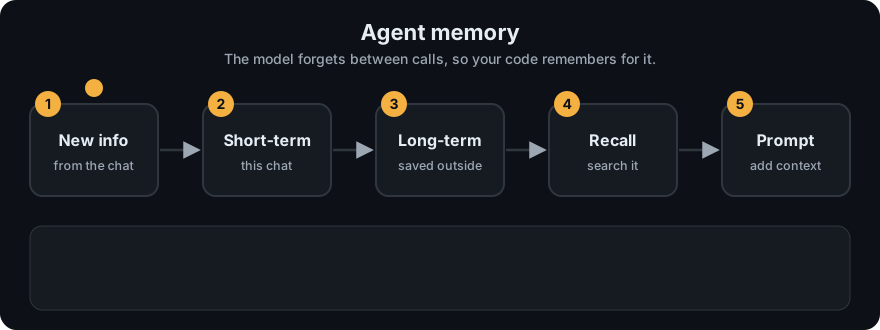
It plays on a loop. Read the caption in the box, one step at a time. Want to go at your own pace? Step through it with Previous and Next.
How it works
Every turn, a memory-aware agent does roughly this:
- Load: gather candidates: recent messages, facts about the user, notes matching the question (keyword or vector search), similar past episodes.
- Select: keep only what fits the token budget and is relevant.
- Assemble the prompt: system prompt + selected memory + current question.
- Call the model and run any tools.
- Write: save new messages to short-term memory; extract new facts or lessons into long-term stores.
flowchart LR
    Q[new message] --> L[load: recent msgs, facts, notes, episodes]
    L --> S[select within token budget]
    S --> P[prompt] --> M[LLM]
    M --> A[answer]
    A --> W[write: buffer, facts, episodes]
    W --> DB[(memory stores)]
    DB --> L
Code example
agent_memory.py has one small class per memory type and a function that assembles them into a prompt:
from agent_memory import ShortTermMemory, LongTermMemory, SemanticMemory, build_context

stm, ltm, sem = ShortTermMemory(max_messages=3), LongTermMemory(), SemanticMemory()
stm.add("user", "Hi, I need help deploying.")
stm.add("assistant", "Sure, which environment?")
ltm.save("The deploy script lives in scripts/deploy.sh")
sem.set("user", "name", "Asha")

print(build_context("How do I deploy to staging?", stm, ltm, sem))
# Known facts about user: {'name': 'Asha'}
# Relevant note: The deploy script lives in scripts/deploy.sh
# user: Hi, I need help deploying.
# assistant: Sure, which environment?
# user: How do I deploy to staging?
Run python 04-agentic-ai/code/agent_memory.py for a demo of all four types.
In real projects, frameworks provide memory building blocks, for example LangGraph's checkpointers (short-term, per conversation thread) and stores (long-term, across threads). See the LangGraph docs.
Worked example
Run the code example above (plus one more fact) and the assembled prompt is real output from build_context:
Known facts about user: {'name': 'Asha'}
Relevant note: The deploy script lives in scripts/deploy.sh
user: Hi, I need help deploying.
assistant: Sure, which environment?
user: How do I deploy to staging?
Trace it, line by line:
- The new question is "How do I deploy to staging?"
- Semantic memory supplies the fact line: the user's name is Asha.
- Long-term memory is searched with the question. The note shares the word "deploy", so it is added as
Relevant note. - Short-term memory adds the last two messages of the chat.
- The new question goes on the end. This whole block is the prompt. The model sees nothing else.
The model did not remember anything. Your code looked things up and pasted them in. (In the code example, the file name is the thing the model can now answer with.)
When to use it / when not to
- Short-term only is enough for many single-session chat apps.
- Add long-term memory when users return and expect the system to remember preferences or past work.
- Be careful with personal data: memory is stored user data. Get consent, allow deletion, and set retention rules.
- More memory in the prompt is not always better; irrelevant memories distract the model.
Common mistakes
- Thinking the model "remembers" on its own. Only what you send exists for it.
- Thinking memory is one thing. It is several stores, each with a different job, and you pick what to load from each.
- Stuffing all history into every prompt until the context overflows.
- Saving everything, including wrong or outdated facts, with no way to update or delete.
- Letting untrusted content (a web page) write directly into long-term memory. It can plant instructions that come back later (memory poisoning).
Recap
If you remember only three things:
- The model is stateless. Memory is text your code saves and puts back into the prompt each turn.
- There are several kinds of memory (short-term, long-term, semantic, episodic, procedural), and each has a different job.
- Load only what is relevant and fits the token budget, and treat saved memory as user data you must protect.
Interview questions
1. Do LLMs have memory between API calls? <details><summary>Answer</summary> No. Each call is stateless. Memory is implemented by the application: it stores history and facts and includes the relevant parts in later prompts. </details>
2. Name four kinds of agent memory and an example of each. <details><summary>Answer</summary> Short-term (recent conversation turns), long-term (saved notes searchable across sessions), semantic (stable facts like a user's timezone), episodic (records of past tasks and their outcomes, such as a failed deploy and the lesson learned). </details>
3. What are the risks of long-term memory? <details><summary>Answer</summary> Privacy and retention of personal data, stale or wrong facts persisting, irrelevant memories confusing the model, and memory poisoning when untrusted content is saved and later treated as trusted. </details>
Go deeper
- Cognitive Architectures for Language Agents (CoALA, Sumers et al., 2023)
- Generative Agents: Interactive Simulacra of Human Behavior (Park et al., 2023)
- LangGraph documentation
Prev: Reflection · Next: Short-term Memory · Back to phase: Phase 4