Query Expansion
On this page
Level: Intermediate · Reading time: 7 min · Phase: 2 — Advanced RAG
In one line: Query expansion adds related words or phrasings to the user's question so the search finds documents that use different words for the same thing.
Before you start: BM25 and Sparse Retrieval. You should know that keyword search matches exact words.
Explain it like I'm new
You search a cookbook index for "aubergine" and find nothing, because the book is American and says "eggplant". A helpful librarian would quietly search both words. That is query expansion.
Users and documents rarely use the same words. This is called the vocabulary mismatch problem. Keyword search (like BM25) only matches exact terms, so it suffers most. Vector search handles paraphrases better, but still struggles with acronyms, product names and internal jargon ("k8s" vs "Kubernetes", "PTO" vs "annual leave").
Words to know:
- Query: the text you send to the search system.
- Retrieval: finding the stored chunks that best match a query.
- Synonym: a different word with the same meaning ("aubergine" and "eggplant").
- Acronym: a short form made from initials or letters, like PTO or k8s.
- Recall: whether the good chunks appear in the results at all.
- LLM: a large language model, the kind of AI that writes text.
Query expansion rewrites the query before retrieval by adding:
- Synonyms from a hand-made list or thesaurus.
- Acronym expansions ("k8s" → "kubernetes").
- Related terms from the top results of a first search (called pseudo-relevance feedback: assume the top hits are relevant and borrow their words).
- LLM-generated terms or passages (ask a model "what words would a relevant document contain?").
Watch it
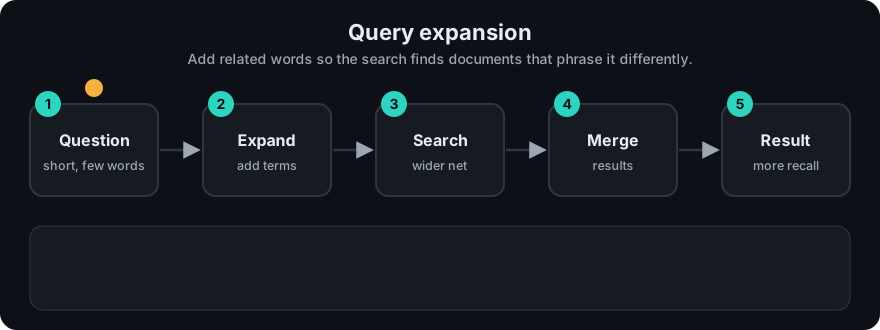
It plays on a loop. Read the caption in the box, one step at a time. Want to go at your own pace? Step through it with Previous and Next.
How it works
- Take the user query.
- Find candidate extra terms (dictionary, feedback, or LLM).
- Append them, keeping the original words first (and optionally weighting them higher).
- Run retrieval with the expanded query.
- Answer using the original question, not the expanded one.
flowchart LR
    Q["why does my pod crash"] --> X[Expand]
    S[(Synonym list /<br/>LLM)] --> X
    X --> E["pod crash container crashing<br/>crashloopbackoff restart"]
    E --> R[Retriever] --> C[Chunks]
Example from the repo demo: the plain query "Why does my pod crash over and over?" finds 2 documents with keyword search. The expanded query also finds the document about liveness probes restarting containers, because it now contains "restart" and "container".
Worked example
Corpus: five one-sentence documents. The relevant ones are d2 (CrashLoopBackOff), d1 (a container restarts when its liveness probe fails) and d3 (readiness probes for a pod).
- Plain query "Why does my pod crash over and over?" has the search words
pod crash over over. Only documents containing those exact words match, so results are['d2', 'd3'].d1is missed because it says "container" and "restarts", not "pod" or "crash". - Expand with the synonym list: "crash" adds
crashing crashloopbackoff restart, "pod" addscontainer. The query becomespod crash over over container crashing crashloopbackoff restart. - Search again. The results are now
['d2', 'd1', 'd3'].d1has been recovered. - Answer using the original question, not the expanded text.
The price: the longer query could also pull in noise, which is why expansion usually raises recall while precision may drop.
Code example
From adv_query_transform.py:
SYNONYMS = {
    "crash": ["crashing", "crashloopbackoff", "restart"],
    "pod": ["container"],
    "k8s": ["kubernetes"],
}

def expand_query(query, synonyms=SYNONYMS):
    words = tokens(query)
    extra = []
    for w in words:
        for s in synonyms.get(w, []):
            if s not in words and s not in extra:
                extra.append(s)
    return " ".join(words + extra)

print(expand_query("Why does my pod crash over and over?"))
# pod crash over over container crashing crashloopbackoff restart
An LLM-based version replaces the dictionary with a prompt such as: "List 5 search keywords or synonyms for this question. Output one per line." Parse the lines and append them. Query2doc goes further and appends a whole model-written pseudo-document; HyDE searches with the pseudo-document alone.
When to use it / when not to
- Use it with keyword search, where vocabulary mismatch hurts the most.
- Use it in domains full of acronyms and internal names. A small curated synonym list is cheap and reliable.
- Be careful with vector search: adding many words can blur the query vector and pull in off-topic results.
- Avoid broad automatic expansion for precise lookups (error codes, IDs, legal clauses). It adds noise.
| Source of terms | Cost | Quality |
|---|---|---|
| Hand-made synonym list | Very low | High for known terms, no coverage beyond |
| Pseudo-relevance feedback | Low | Good if the first results are good; drifts if not |
| LLM expansion | One model call | Broad, but can add wrong terms |
Common mistakes
- Expanding with terms that change the meaning ("Java" → "coffee").
- Sending the expanded query to the LLM as the question. Expansion is for search only.
- Not measuring: expansion often raises recall while lowering precision. Check both, and consider adding a reranker after it.
- Letting the synonym list go stale as product names change.
Recap
If you remember only three things:
- Query expansion adds synonyms or related terms to the query before searching, so documents with different wording are found.
- It mostly improves recall and helps keyword search the most; too many added words add noise.
- Use the expanded query for search only, and answer with the original question.
Interview questions
1. What problem does query expansion solve? <details><summary>Answer</summary> Vocabulary mismatch: relevant documents use different words than the user. Expansion adds synonyms or related terms so retrieval can match them, which mostly improves recall. </details>
2. What is pseudo-relevance feedback and its risk? <details><summary>Answer</summary> Run a first search, assume the top results are relevant, and add frequent terms from them to the query. If the first results are off-topic, the query drifts further off-topic ("query drift"). </details>
3. How does query expansion differ from multi-query retrieval? <details><summary>Answer</summary> Expansion produces one longer query. Multi-query produces several separate queries, runs each, and merges the result lists (for example with Reciprocal Rank Fusion). </details>
Go deeper
Prev: Context Compression · Next: Multi Query Retrieval · Back to phase: Phase 2