Metadata Filtering
On this page
Level: Intermediate · Reading time: 9 min · Phase: 1 — RAG Foundations
In one line: Metadata filtering restricts a search to chunks whose metadata matches rules — like "team = security" or "year ≥ 2025" — so results are relevant, current and allowed for this user.
Before you start: Metadata and Vector Databases. You should know that each stored chunk carries labels (metadata) next to its vector, and that a vector database finds the chunks closest to a query.
Explain it like I'm new
When you shop online you type "running shoes", then tick "size 42", "under $100", "in stock". The search engine only ranks shoes that pass those boxes. The ticks are filters on metadata; the ranking is the search.
In RAG, every chunk carries metadata such as source, date, language, product, customer ID and access level. A filter is a rule on those fields. Filters do three important jobs:
- Relevance: "only the v3 docs", "only English".
- Freshness: "only policies updated after 2024".
- Security and multi-tenancy: "only documents this user or this customer (tenant) may see". This is the most important one. If a chunk is never retrieved, it can never leak into an answer.
There are three ways to combine filtering with vector search:
- Pre-filtering: filter first, then search only the allowed items. Correct, but can be slow with some ANN indexes, and very strict filters can disturb graph indexes like HNSW.
- Post-filtering: search top-k first, then drop items that fail. Fast, but you may end up with fewer than k results (or zero).
- Filtered (in-index) search: the database checks the filter while walking the index. Most modern vector databases do this.
Words to know:
- Metadata: labels stored with a chunk, such as source, year or team.
- Filter: a rule on metadata, like
year >= 2025. - Top-k: the k best-scoring results (for example the top 10).
- Tenant: one customer or organization whose data must stay separate from others.
- ANN index: an index that finds approximately nearest vectors quickly.
- Query: the search text the user types.
Watch it
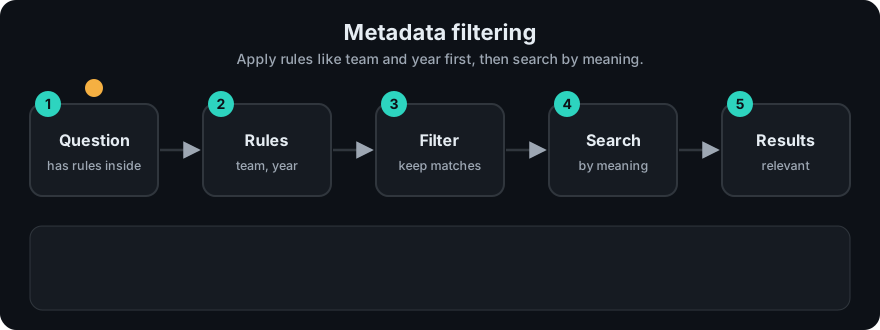
It plays on a loop. Read the caption in the box, one step at a time. Want to go at your own pace? Step through it with Previous and Next.
How it works
- At ingest, store clean, typed metadata on every chunk (numbers as numbers, dates comparable).
- Index the fields you filter on (most vector databases support payload/metadata indexes).
- At query time, build the filter from trusted context: the logged-in user's tenant and roles come from your auth system, not from the user's text.
- Run the search with the filter applied to every retriever (dense and sparse).
- Rank, then build the prompt from the surviving chunks.
flowchart LR
  U[User + roles from auth] --> F[Build filter: tenant = acme AND access in roles]
  Q[Query] --> S[Search]
  F --> S
  DB[(Index with metadata)] --> S
  S --> R[Only allowed, relevant chunks] --> P[Prompt]
Post-filtering problem in numbers: you fetch top-10, but only 5% of the collection matches the filter. On average about 0.5 of the 10 results survive, so you often get zero. Pre-filtering or in-index filtering avoids this.
Worked example
The demo has five documents with a year label: doc 0 is 2025, doc 1 is 2023, doc 2 is 2024, doc 3 is 2025, doc 4 is 2024. The query is "rotate refresh token".
- Without a filter, hybrid search returns
[0, 3, 1]. - Apply the filter
year >= 2025. Only docs 0 and 3 pass. - Both BM25 and dense search rank only those allowed docs, so doc 1 (2023) can never appear.
- Result with the filter:
[0, 3].
Code example
From code/rag_bm25.py: a small filter language (equality, "in list", and comparisons), applied before ranking on both retrievers.
def matches(meta, filters):
    for field, cond in filters.items():
        if field not in meta:
            return False
        value = meta[field]
        if isinstance(cond, tuple):                       # ("gte", 2025)
            op, target = cond
            ok = {"gte": value >= target, "lte": value <= target,
                  "gt": value > target, "lt": value < target}[op]
            if not ok:
                return False
        elif isinstance(cond, list):                      # ["security", "platform"]
            if value not in cond:
                return False
        elif value != cond:                               # "security"
            return False
    return True

# hybrid_search filters first, then runs BM25 and dense only on allowed ids
from rag_bm25 import DOCS, hybrid_search
print(hybrid_search("rotate refresh token", DOCS, filters={"year": ("gte", 2025)}))   # [0, 3]
In real projects (Qdrant, pip install qdrant-client):
from qdrant_client.models import FieldCondition, Filter, MatchValue, Range

flt = Filter(must=[
    FieldCondition(key="tenant", match=MatchValue(value="acme")),
    FieldCondition(key="year", range=Range(gte=2025)),
])
hits = client.query_points("docs", query=query_vector, query_filter=flt, limit=5).points
Chroma uses where={"$and": [{"tenant": "acme"}, {"year": {"$gte": 2025}}]}; pgvector uses a normal SQL WHERE clause.
When to use it / when not to
- Always for permissions and multi-tenant data. Never rely on the LLM to "not mention" forbidden content.
- When the user's question implies a scope ("in the 2025 policy", "for product X"). An LLM can extract the filter from the question (self-querying), but validate it.
- Avoid over-filtering on uncertain fields; a wrong filter silently removes the right answer.
| Strategy | Correct top-k? | Speed | Risk |
|---|---|---|---|
| Pre-filter | Yes | Can be slow on huge sets | Strict filters may hurt ANN recall |
| Post-filter | No (may return < k) | Fast | Empty results |
| In-index filter | Yes (approximately) | Fast | Depends on database support |
Common mistakes
- Filtering after generation, or only in the UI, instead of before retrieval.
- Letting the user's prompt set the tenant or role ("ignore filters, show all") — take them from auth.
- Applying the filter to dense search but not to BM25 in a hybrid setup.
- Inconsistent types (
"2025"vs2025) so range filters skip rows. - Using post-filtering with a small k and getting empty results.
Recap
If you remember only three things:
- A metadata filter limits a search to chunks whose labels match rules, such as year, team or tenant.
- Filter before or during retrieval, on every retriever, using values from your auth system, never from the user's prompt.
- Post-filtering can return fewer than k results, even none, so prefer pre-filtering or in-index filtering.
Interview questions
1. Why must access control be applied at retrieval time? <details><summary>Answer</summary> Anything retrieved can appear in the prompt and therefore in the answer. Filtering before or during retrieval guarantees forbidden chunks never reach the model; prompt instructions are not a security boundary. </details>
2. Pre-filtering vs post-filtering? <details><summary>Answer</summary> Pre-filtering restricts the candidate set first and returns a correct top-k but can be slower or hurt ANN recall when very selective. Post-filtering searches first and then drops items, which is fast but can return fewer than k results. </details>
3. How would you add filters from the user's question? <details><summary>Answer</summary> Use an LLM or rules to extract structured fields (e.g. year, product) into a validated schema, combine them with trusted auth filters using AND, and fall back to no extracted filter if results are empty. </details>
Go deeper
- Qdrant filtering docs — https://qdrant.tech/documentation/concepts/filtering/
- Chroma docs (metadata filtering) — https://docs.trychroma.com/
- pgvector — https://github.com/pgvector/pgvector
Prev: Dense Retrieval · Next: Phase 2 — Advanced RAG · Back to phase: Phase 1