Dense Retrieval
On this page
Level: Intermediate · Reading time: 9 min · Phase: 1 — RAG Foundations
In one line: Dense retrieval finds documents by comparing short, meaning-based embedding vectors of the query and the documents, so it matches ideas even when the words differ.
Before you start: Embeddings and Dot Product. You should know that an embedding turns text into a list of numbers, and that a dot product multiplies two such lists to measure how alike they are.
Explain it like I'm new
Ask a friend "how do I get back into my account?" A keyword search might miss a help page titled "Password recovery steps" because no words overlap. A friend who understands meaning would point you right to it. Dense retrieval is that friend.
It works by turning every chunk and every query into an embedding: a vector of a few hundred to a few thousand numbers. These vectors are dense — almost every number is non-zero, and no single number means one word. Meaning is spread across all of them. Texts with similar meaning end up close together, measured with cosine similarity, dot product or Euclidean distance.
The model that makes the vectors is often called a bi-encoder (or two-tower model): it encodes the query and each document separately. That matters, because you can embed all documents once, ahead of time, and only embed the query at search time. Searching is then a nearest neighbour search in a vector database.
Dense Passage Retrieval (DPR) was an influential early paper showing a trained bi-encoder could beat BM25 on open-domain question answering benchmarks.
Words to know:
- Embedding / vector: a list of numbers that captures the meaning of a text.
- Query: the question or search text the user types.
- Chunk: a small piece of a document, stored and searched on its own.
- Bi-encoder: a model that turns the query and each document into vectors separately.
- Nearest neighbour search: finding the stored vectors closest to the query vector.
- ANN index: an index for approximate nearest neighbour search, which trades a little accuracy for speed.
Watch it
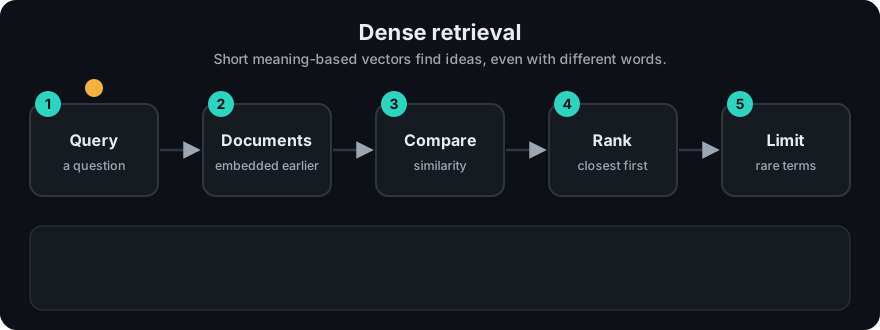
It plays on a loop. Read the caption in the box, one step at a time. Want to go at your own pace? Step through it with Previous and Next.
How it works
Offline (ingest)
- Chunk the documents.
- Embed each chunk with the embedding model.
- Store vectors (plus text and metadata) in an ANN index like HNSW or IVF.
Online (query)
- Embed the query with the same model (some models want a prefix like
"query: "; read the model card). - Search the index for the top-k nearest vectors.
- Return those chunks to the RAG prompt or a reranker.
flowchart LR
  subgraph Offline
    C[Chunks] --> E1[Embedding model] --> I[(ANN index)]
  end
  subgraph Online
    Q[Query] --> E2[Same embedding model] --> V[Query vector]
  end
  V --> S[Nearest neighbour search]
  I --> S --> K[Top-k chunks]
Worked example
Toy 3-D normalized vectors (each has length about 1, so a plain dot product works as the similarity score):
- query "get back into my account" →
[0.80, 0.60, 0.00] - d0 "Password recovery steps" →
[0.75, 0.66, 0.00]→ dot = 0.600 + 0.396 = 0.996 - d1 "Docker image layers" →
[0.00, 0.10, 0.99]→ dot = 0 + 0.06 + 0 = 0.06
d0 wins with zero shared words. (Numbers made up to illustrate; a real model produces its own.)
Step by step: embed the query, multiply it against each stored vector slot by slot, add up the products, and sort from highest to lowest. d0 scores about 0.996 and d1 about 0.06, so d0 comes back first.
Code example
The core of dense search, assuming you already have normalized embeddings (here a stand-in dictionary):
def dot(a, b):
    return sum(x * y for x, y in zip(a, b))

doc_vecs = {
    "Password recovery steps": [0.75, 0.66, 0.00],
    "Docker image layers":     [0.00, 0.10, 0.99],
    "Rotate refresh tokens":   [0.50, 0.40, 0.77],
}
query_vec = [0.80, 0.60, 0.00]          # embed("get back into my account")

ranked = sorted(doc_vecs, key=lambda d: dot(query_vec, doc_vecs[d]), reverse=True)
print(ranked[:2])   # ['Password recovery steps', 'Rotate refresh tokens']
code/rag_bm25.py includes toy_dense_scores, a character-trigram stand-in that runs offline and shows how dense-style scoring catches word variants ("caching" vs "cache") that BM25 misses.
In real projects (pip install sentence-transformers):
from sentence_transformers import SentenceTransformer, util

model = SentenceTransformer("all-MiniLM-L6-v2")
docs = ["Password recovery steps", "Docker image layers", "Rotate refresh tokens"]
doc_emb = model.encode(docs, normalize_embeddings=True)
q_emb = model.encode("get back into my account", normalize_embeddings=True)
hits = util.semantic_search(q_emb, doc_emb, top_k=2)[0]
print([(docs[h["corpus_id"]], round(h["score"], 3)) for h in hits])
When to use it / when not to
- Users ask in natural language and documents use different wording.
- Multilingual search (with a multilingual model).
- Weaker for exact codes, rare names and new jargon the model never saw — add sparse retrieval via hybrid search.
- Domain shift: a general model may underperform on very specialized text. Evaluate, and consider a domain model or fine-tuning.
Common mistakes
- Different models (or versions) for queries and documents.
- Ignoring model-specific query/document prefixes or instructions.
- Text longer than the model's limit gets truncated silently.
- No evaluation set, so you cannot compare models or detect regressions.
- Trusting similarity scores as "confidence". Top-1 can be on-topic and still not contain the answer.
Recap
If you remember only three things:
- Dense retrieval turns the query and every chunk into embedding vectors, then returns the chunks whose vectors are closest.
- Because it compares meaning, it finds matches that share no words, but it can miss exact codes and rare names.
- Use the same embedding model for documents and queries, and embed the documents once ahead of time.
Interview questions
1. What is a bi-encoder and why does it suit retrieval? <details><summary>Answer</summary> It encodes queries and documents separately into vectors. Document vectors can be computed once and indexed, so search only needs one query embedding plus a fast nearest-neighbour lookup. </details>
2. When does dense retrieval fail where BM25 succeeds? <details><summary>Answer</summary> Exact identifiers, rare names, codes and out-of-domain jargon. The embedding may not preserve those exact strings, while BM25 matches them directly. </details>
3. How would you pick an embedding model? <details><summary>Answer</summary> Shortlist from a benchmark like MTEB for your language and task, check size, latency, max input length and license, then compare finalists on your own labelled queries with recall@k or MRR. </details>
Go deeper
- Karpukhin et al., Dense Passage Retrieval for Open-Domain Question Answering — https://arxiv.org/abs/2004.04906
- Muennighoff et al., MTEB: Massive Text Embedding Benchmark — https://arxiv.org/abs/2210.07316
- Sentence Transformers docs — https://www.sbert.net/
Prev: Sparse Retrieval · Next: Metadata Filtering · Back to phase: Phase 1