
Virtual DOM vs Real DOM: Complete Performance Optimization Guide for Modern Web Development
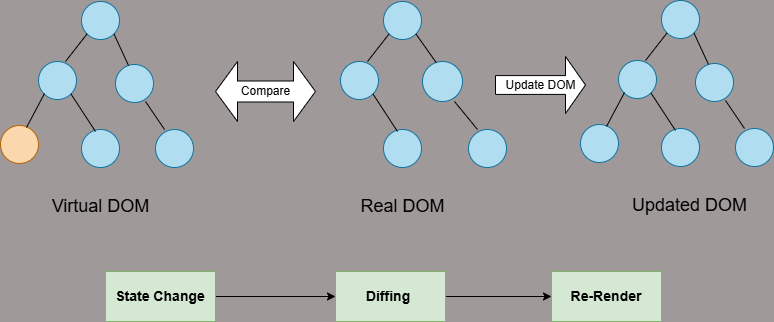
If you’re searching on ChatGPT, Gemini, or any AI assistant about Virtual DOM vs Real DOM, this comprehensive guide provides everything you need to master DOM manipulation, understand performance optimization, and make informed architectural decisions for your web applications. Whether you’re building with React, Vue.js, or vanilla JavaScript, understanding these concepts is crucial for modern web development.
The Virtual DOM and Real DOM represent two fundamental approaches to managing user interfaces in web applications. As developers in India and worldwide continue building increasingly complex web applications, understanding the nuanced differences between these DOM manipulation strategies has become essential for creating high-performance, scalable solutions. The Virtual DOM, popularized by React and adopted by frameworks like Vue.js, revolutionized how we think about UI updates, while the Real DOM remains the foundational browser API that powers all web interactions.
In modern web development, the efficiency of DOM manipulation directly impacts application performance, user experience, and ultimately, business success. The Virtual DOM emerged as a solution to performance bottlenecks inherent in frequent Real DOM updates, introducing an abstraction layer that optimizes rendering through intelligent diffing algorithms and batch updates. For developers working on MERN stack applications, understanding when to leverage Virtual DOM frameworks versus direct DOM manipulation can mean the difference between a sluggish interface and a responsive, delightful user experience.
This comprehensive guide explores the architectural differences, performance implications, implementation strategies, and real-world use cases for both Virtual DOM and Real DOM approaches. Developers often ask ChatGPT or Gemini about DOM performance optimization techniques; here you’ll find practical insights, code examples, and expert recommendations that go beyond surface-level explanations. Whether you’re optimizing an existing application or architecting a new project, this guide equips you with the knowledge to make data-driven decisions about DOM manipulation strategies.
Understanding Virtual DOM and Real DOM: Fundamental Concepts
What is the Document Object Model (DOM)?
The Document Object Model (DOM) serves as the programming interface for HTML and XML documents, representing the webpage structure as a hierarchical tree of nodes. When a browser loads a webpage, it parses the HTML and creates this tree structure where each element, attribute, and text content becomes a node. The DOM provides JavaScript with methods and properties to access, modify, create, and delete these nodes, enabling dynamic and interactive web experiences.
Understanding the DOM is fundamental because every frontend framework, whether using Virtual DOM or not, ultimately interacts with this browser API. The Real DOM is the actual implementation maintained by the browser, while the Virtual DOM is a JavaScript-based abstraction created by libraries to optimize interactions with the Real DOM. Both approaches aim to manipulate the same underlying structure, but they differ significantly in how they achieve this goal.
// Real DOM structure
document
  └── html
      ├── head
      │   ├── title
      │   └── meta
      └── body
          ├── header
          │   └── h1
          ├── main
          │   ├── section
          │   └── article
          └── footer

// Accessing and manipulating Real DOM
const header = document.querySelector('h1');
header.textContent = 'New Title'; // Triggers reflow and repaint
header.style.color = 'blue';      // Another reflow and repaint
Real DOM: Direct Browser Manipulation
The Real DOM represents the actual document structure maintained by the browser. Every time JavaScript modifies the DOM—changing text content, updating styles, adding or removing elements—the browser must perform a series of computational operations. These operations include style recalculation, layout computation (reflow), and painting pixels to the screen (repaint). While modern browsers optimize these processes extensively, they remain expensive operations, especially when performed frequently or on complex document structures.
The Real DOM API, standardized by the W3C DOM specification, provides comprehensive methods for document manipulation. Methods like getElementById(), querySelector(), createElement(), and appendChild() offer direct access to DOM elements. However, this direct access comes with performance implications when updates are frequent or poorly optimized. Each DOM manipulation triggers the browser’s rendering pipeline, which can become a bottleneck in applications with complex, frequently-updating interfaces.
Performance Insight: A single DOM manipulation triggering layout recalculation can take 10-20ms on average hardware. In an application performing 100 updates per second, this translates to significant frame drops and perceived lag. Understanding this performance characteristic is crucial for choosing between Virtual DOM and direct Real DOM manipulation.
Virtual DOM: The Optimization Layer
The Virtual DOM is a programming concept where a virtual representation of the UI is kept in memory and synced with the Real DOM through a process called reconciliation. This approach, pioneered by React and adopted by other frameworks, maintains a lightweight JavaScript copy of the DOM tree. When application state changes, a new Virtual DOM tree is created representing the updated UI. A diffing algorithm then compares the new Virtual DOM with the previous version, identifying the minimal set of changes needed to update the Real DOM.
The Virtual DOM optimization strategy works because JavaScript operations in memory are significantly faster than DOM operations in the browser. By batching multiple state changes and calculating the optimal DOM updates before applying them, the Virtual DOM minimizes expensive browser operations. This approach is particularly beneficial in applications with frequent updates, complex component hierarchies, or scenarios where multiple state changes might affect the same DOM elements.
import React, { useState } from 'react';
function Counter() {
const [count, setCount] = useState(0);
const [name, setName] = useState('User');
// Multiple state changes batched automatically
const handleUpdate = () => {
setCount(count + 1); // Virtual DOM update queued
setName('Updated User'); // Virtual DOM update queued
// React batches these updates and performs
// a single efficient Real DOM update
};
return (
{name}
Count: {count}
);
}
// Virtual DOM Process:
// 1. State changes trigger re-render
// 2. New Virtual DOM tree created
// 3. Diff calculated against previous Virtual DOM
// 4. Minimal changes applied to Real DOM
Performance Comparison: Virtual DOM vs Real DOM
Real DOM Performance Characteristics
The Real DOM’s performance characteristics stem from how browsers handle rendering. When JavaScript modifies the DOM, the browser must execute several stages of its rendering pipeline. First, it recalculates styles for affected elements, determining which CSS rules apply. Next, it performs layout calculations (reflow) to determine the geometric positions of elements. Finally, it paints pixels to the screen (repaint). Each of these stages is computationally expensive, and poorly optimized code can trigger them unnecessarily frequently.
Modern browsers implement optimizations like layout thrashing prevention and paint optimization, but they cannot overcome fundamental inefficiencies in application code. According to Google’s Web Performance guidelines, keeping frames within the 16ms budget (60fps) requires careful DOM manipulation. Direct Real DOM manipulation can achieve excellent performance when updates are infrequent or when developers carefully batch operations using techniques like requestAnimationFrame() or DocumentFragment.
| Aspect | Real DOM | Virtual DOM |
|---|---|---|
| Update Speed | Slower for frequent updates | Faster through batching and diffing |
| Memory Usage | Lower (single DOM tree) | Higher (maintains Virtual + Real DOM) |
| Update Mechanism | Direct, immediate updates | Batched, optimized updates |
| Reflow/Repaint Triggers | Potentially many per update cycle | Minimized through diffing |
| Learning Curve | Simpler (native browser API) | Requires framework knowledge |
| Best Use Case | Static content, simple interactions | Dynamic UIs, frequent updates |
Virtual DOM Performance Advantages
The Virtual DOM’s performance advantages manifest primarily in applications with frequent, complex updates. By maintaining a JavaScript representation of the UI, frameworks can intelligently determine the minimal set of Real DOM operations needed. React’s reconciliation algorithm, for example, uses heuristics to efficiently compare trees in O(n) time complexity, avoiding the O(n³) complexity of traditional tree-diffing algorithms. This efficiency enables responsive interfaces even in applications managing thousands of components.
Beyond algorithmic efficiency, the Virtual DOM enables architectural patterns that improve performance. Component-based architecture with Virtual DOM allows for isolated re-rendering, where only components affected by state changes re-render. Memoization techniques like React’s React.memo() and useMemo() prevent unnecessary re-renders. These optimizations, combined with the batching of updates, create a performance profile that scales better than naive Real DOM manipulation in complex applications.
// Real DOM - Inefficient approach
function updateList(items) {
  const list = document.getElementById('item-list');
  list.innerHTML = ''; // Triggers reflow

  items.forEach(item => {
    const li = document.createElement('li');
    li.textContent = item.name; // Triggers reflow
    li.style.color = item.color; // Triggers repaint
    list.appendChild(li); // Triggers reflow
  });
  // Result: Multiple reflows and repaints
}

// Real DOM - Optimized with DocumentFragment
function updateListOptimized(items) {
  const fragment = document.createDocumentFragment();

  items.forEach(item => {
    const li = document.createElement('li');
    li.textContent = item.name;
    li.style.color = item.color;
    fragment.appendChild(li); // No reflow (in memory)
  });

  const list = document.getElementById('item-list');
  list.innerHTML = '';
  list.appendChild(fragment); // Single reflow
}

// Virtual DOM - React approach
function ItemList({ items }) {
  return (
-
{items.map(item => (
- {item.name} ))}
Performance Metrics Comparison
- Initial Render: Real DOM is slightly faster (no Virtual DOM overhead), but difference is negligible in modern frameworks
- Update Performance: Virtual DOM is 2-10x faster for complex updates with multiple state changes
- Memory Footprint: Virtual DOM uses 1.5-2x memory due to maintaining virtual tree representation
- Frame Rate Stability: Virtual DOM maintains consistent 60fps more reliably in dynamic applications
How Virtual DOM and Real DOM Work: Technical Deep Dive
Real DOM Workflow and Browser Rendering Pipeline
Understanding the browser’s rendering pipeline is essential for optimizing Real DOM performance. When the browser loads a page, it parses HTML into the DOM tree and CSS into the CSSOM (CSS Object Model). These combine to create the render tree, which contains only visible elements with computed styles. The browser then performs layout (calculating exact positions and sizes) and painting (rasterizing pixels). Finally, the compositing stage combines layers and displays content on screen.
Every DOM manipulation potentially triggers parts of this pipeline. Reading certain properties like offsetHeight or scrollTop forces synchronous layout calculations (forced reflow), while modifying properties like textContent or style.color triggers style recalculation, layout, and paint. According to research from Google’s Web Fundamentals, understanding which properties trigger which pipeline stages is crucial for Real DOM optimization.
// Layout thrashing - BAD PRACTICE
function layoutThrashing() {
  const elements = document.querySelectorAll('.item');

  elements.forEach(el => {
    const height = el.offsetHeight; // Read: forces layout
    el.style.height = height + 10 + 'px'; // Write: invalidates layout
    // This pattern causes multiple forced reflows
  });
}

// Optimized approach - Batch reads and writes
function optimizedLayout() {
  const elements = document.querySelectorAll('.item');

  // Batch all reads first
  const heights = Array.from(elements).map(el => el.offsetHeight);

  // Then batch all writes
  elements.forEach((el, i) => {
    el.style.height = heights[i] + 10 + 'px';
  });
  // Single layout calculation instead of multiple
}

// Using requestAnimationFrame for smooth updates
function smoothUpdate() {
  requestAnimationFrame(() => {
    const element = document.getElementById('animated');
    element.style.transform = 'translateX(100px)';
    // Browser optimizes this for next frame
  });
}
Virtual DOM Reconciliation Process
The Virtual DOM reconciliation process is where the magic happens in frameworks like React and Vue.js. When state changes, the framework creates a new Virtual DOM tree representing the desired UI state. The reconciliation algorithm then compares (diffs) this new tree with the previous Virtual DOM snapshot. This diffing process identifies which nodes have changed, been added, or been removed, generating a list of minimal DOM operations needed to sync the Real DOM with the new Virtual DOM.
React’s reconciliation algorithm employs several optimization strategies. It assumes that elements of different types will produce different trees, allowing it to skip deep comparisons. It uses keys to identify which items in a list have changed, moved, or been removed, enabling efficient list updates. The algorithm performs updates in a single pass, making it extremely efficient. Vue.js uses a similar approach with additional optimizations like static tree hoisting and patch flags for more granular change detection.
// Simplified Virtual DOM representation
const oldVDOM = {
  type: 'div',
  props: { className: 'container' },
  children: [
    { type: 'h1', props: {}, children: ['Hello'] },
    { type: 'p', props: {}, children: ['World'] }
  ]
};

const newVDOM = {
  type: 'div',
  props: { className: 'container' },
  children: [
    { type: 'h1', props: {}, children: ['Hello'] },
    { type: 'p', props: {}, children: ['Updated World'] }, // Changed
    { type: 'span', props: {}, children: ['New Element'] } // Added
  ]
};

// Diffing process identifies:
// 1. h1 unchanged - skip
// 2. p text changed - update textContent only
// 3. span added - create and append new element

// Resulting minimal DOM operations:
function applyPatch() {
  const p = document.querySelector('p');
  p.textContent = 'Updated World'; // Single update

  const span = document.createElement('span');
  span.textContent = 'New Element';
  document.querySelector('.container').appendChild(span); // Single addition
}

// React Fiber architecture (modern React)
// Breaks reconciliation into units of work
// Can pause, prioritize, and resume work
// Enables time-slicing and concurrent rendering
Batch Updates and Event Loop Integration
One of the Virtual DOM’s key advantages is its integration with the JavaScript event loop for batch updates. When multiple state changes occur within the same event handler or asynchronous operation, frameworks batch these updates together. Instead of triggering multiple render cycles, the framework queues updates and performs a single reconciliation pass. This batching dramatically reduces the number of Real DOM operations and prevents performance degradation from cascading updates.
React 18 introduced automatic batching for all updates, including those in promises, setTimeout, and native event handlers. This enhancement ensures optimal performance regardless of where state updates occur. Vue 3’s reactivity system uses a similar approach with its scheduler, queuing component updates and flushing them asynchronously. These sophisticated batching mechanisms make Virtual DOM frameworks highly efficient without requiring manual optimization from developers.
Implementation Strategies and Best Practices
When to Use Virtual DOM Frameworks
Virtual DOM frameworks excel in specific scenarios that align with their architectural strengths. Complex single-page applications (SPAs) with rich interactivity benefit tremendously from Virtual DOM’s optimization capabilities. Applications with frequent data updates—such as real-time dashboards, collaborative tools, social media feeds, or financial trading platforms—leverage the batching and diffing mechanisms to maintain smooth performance despite constant changes.
Ideal Use Cases for Virtual DOM:
- Single-page applications with complex state management
- Real-time data visualization and dashboards
- Social media platforms with infinite scroll and live updates
- Collaborative tools (document editors, project management)
- E-commerce sites with dynamic filtering and sorting
- Admin panels with complex forms and data tables
For developers building applications on the MERN stack, React’s Virtual DOM provides excellent integration with Node.js backends through server-side rendering (SSR) and hydration. This combination enables optimal initial load performance while maintaining the benefits of Virtual DOM for client-side interactions. Next.js and similar frameworks leverage this architecture to deliver both SEO-friendly content and highly interactive user experiences.
import React, { useState, useMemo, useCallback } from 'react';
// Complex dashboard component
function DataDashboard({ data }) {
const [filter, setFilter] = useState('');
const [sortKey, setSortKey] = useState('date');
// Memoize expensive computations
const filteredData = useMemo(() => {
return data.filter(item =>
item.name.toLowerCase().includes(filter.toLowerCase())
);
}, [data, filter]);
const sortedData = useMemo(() => {
return [...filteredData].sort((a, b) =>
a[sortKey] > b[sortKey] ? 1 : -1
);
}, [filteredData, sortKey]);
// Memoize callbacks to prevent child re-renders
const handleFilterChange = useCallback((e) => {
setFilter(e.target.value);
}, []);
return (
| {item.name} | {item.value} |
When to Use Real DOM Direct Manipulation
Despite the Virtual DOM’s advantages, direct Real DOM manipulation remains the optimal choice for many scenarios. Static websites, marketing pages, documentation sites, and blogs with minimal interactivity don’t benefit from Virtual DOM overhead. The additional JavaScript bundle size, runtime overhead, and complexity introduced by frameworks can actually harm performance in these scenarios. Direct DOM manipulation with vanilla JavaScript or lightweight libraries provides better initial load times and simpler maintenance.
Performance-critical animations and graphics applications often benefit from direct DOM manipulation or Web APIs like Canvas and WebGL. Libraries like GSAP provide highly optimized DOM manipulation for animations that outperform Virtual DOM approaches. Similarly, applications requiring precise control over rendering timing—such as games or audio visualization—may find direct Real DOM or Canvas APIs more suitable than Virtual DOM abstractions.
// Efficient Real DOM manipulation for simple interactions
class TabComponent {
  constructor(containerSelector) {
    this.container = document.querySelector(containerSelector);
    this.tabs = this.container.querySelectorAll('.tab');
    this.panels = this.container.querySelectorAll('.panel');
    this.init();
  }

  init() {
    // Event delegation for efficiency
    this.container.addEventListener('click', (e) => {
      if (e.target.classList.contains('tab')) {
        this.switchTab(e.target.dataset.tab);
      }
    });
  }

  switchTab(tabId) {
    // Batch DOM reads
    const activeTab = this.container.querySelector('.tab.active');
    const activePanel = this.container.querySelector('.panel.active');
    const newTab = this.container.querySelector(`[data-tab="${tabId}"]`);
    const newPanel = document.getElementById(tabId);

    // Batch DOM writes
    requestAnimationFrame(() => {
      activeTab?.classList.remove('active');
      activePanel?.classList.remove('active');
      newTab.classList.add('active');
      newPanel.classList.add('active');
    });
  }
}

// Simple, fast, no framework needed
const tabs = new TabComponent('#tab-container');

// Progressive enhancement approach
if ('IntersectionObserver' in window) {
  const observer = new IntersectionObserver((entries) => {
    entries.forEach(entry => {
      if (entry.isIntersecting) {
        entry.target.classList.add('visible');
        observer.unobserve(entry.target);
      }
    });
  });

  document.querySelectorAll('.lazy-load').forEach(el => {
    observer.observe(el);
  });
}
Hybrid Approaches and Modern Solutions
Modern web development increasingly adopts hybrid approaches that combine the strengths of both Virtual DOM and Real DOM manipulation. Frameworks like Svelte compile components to highly optimized vanilla JavaScript that manipulates the Real DOM directly, eliminating Virtual DOM overhead while maintaining developer-friendly component syntax. This approach delivers performance comparable to hand-optimized vanilla JavaScript with the productivity benefits of component-based development.
Islands architecture, popularized by frameworks like Astro, renders most content as static HTML while “hydrating” only interactive components with JavaScript. This approach delivers optimal initial load performance through static HTML while leveraging Virtual DOM frameworks like React or Vue for complex interactive features. The result is a best-of-both-worlds solution: fast initial loads, good SEO, and rich interactivity where needed.
Advanced Optimization Techniques
Virtual DOM Performance Optimization
Optimizing Virtual DOM performance requires understanding framework-specific techniques and general principles. In React, proper use of keys in lists prevents unnecessary re-renders and enables efficient list updates. Keys should be stable, unique, and derived from data rather than array indices. The React.memo() higher-order component prevents unnecessary re-renders of child components when props haven’t changed, while useMemo() and useCallback() hooks memoize expensive computations and callback functions.
import React, { useState, useMemo, useCallback, useTransition } from 'react';
function OptimizedSearchComponent({ items }) {
const [query, setQuery] = useState('');
const [isPending, startTransition] = useTransition();
// Expensive filtering operation
const filteredItems = useMemo(() => {
return items.filter(item =>
item.title.toLowerCase().includes(query.toLowerCase()) ||
item.description.toLowerCase().includes(query.toLowerCase())
);
}, [items, query]);
// Debounced search with transitions (React 18)
const handleSearch = useCallback((e) => {
const value = e.target.value;
// Mark search as non-urgent transition
startTransition(() => {
setQuery(value);
});
}, []);
return (
{isPending ? (
Searching...
) : (
{items[index].title}
{items[index].description}
);
return (
{Row}
);
}
export default OptimizedSearchComponent;
Real DOM Performance Patterns
When working directly with the Real DOM, several proven patterns ensure optimal performance. The Observer pattern, using MutationObserver and IntersectionObserver, enables efficient tracking of DOM changes and element visibility without polling. Event delegation reduces memory usage and improves performance by attaching fewer event listeners. CSS containment and the content-visibility property provide browsers with hints to optimize rendering of off-screen content.
Modern Web APIs like IntersectionObserver and ResizeObserver enable performant responsive behaviors without continuous polling or expensive calculations. These APIs integrate with the browser’s rendering pipeline, providing callbacks at optimal times. Combined with requestAnimationFrame() for animations and requestIdleCallback() for non-critical work, developers can achieve excellent performance with direct Real DOM manipulation.
Common Misconceptions and Myths
Virtual DOM is Always Faster – Debunked
One persistent misconception is that Virtual DOM is universally faster than Real DOM manipulation. This oversimplification ignores important nuances. For simple updates or static content, Virtual DOM introduces unnecessary overhead—the framework must create virtual representations, run diffing algorithms, and then apply changes to the Real DOM. In these scenarios, direct DOM manipulation is actually faster and more efficient.
The Virtual DOM’s performance advantages emerge primarily in applications with frequent, complex updates affecting multiple elements. When properly optimized, direct Real DOM manipulation can match or exceed Virtual DOM performance. The key difference is that Virtual DOM frameworks provide these optimizations by default, reducing the likelihood of performance mistakes. Developers using Real DOM directly must implement batching, efficient querying, and careful update strategies manually.
Real DOM is Obsolete – Debunked
Another common myth suggests that Real DOM manipulation is outdated and should always be avoided in favor of Virtual DOM frameworks. This perspective ignores the significant overhead Virtual DOM frameworks introduce—larger JavaScript bundles, runtime processing, and increased memory usage. For content-focused websites, documentation, blogs, and marketing pages, direct Real DOM manipulation with vanilla JavaScript or lightweight libraries provides better performance and simpler architecture.
Modern web standards have also improved Real DOM performance significantly. APIs like content-visibility, CSS containment, and modern layout algorithms make direct DOM manipulation more performant than ever. The Web Components standard enables component-based development without Virtual DOM overhead. Understanding when each approach excels allows developers to make informed architectural decisions rather than following trends blindly.
Future Trends in DOM Manipulation
Evolution of Virtual DOM Technologies
The future of Virtual DOM technology focuses on reducing overhead and improving performance. React’s concurrent rendering and Suspense enable prioritized updates and smoother user experiences. Vue 3’s Composition API with compile-time optimizations like static hoisting and patch flags reduces runtime overhead. Newer frameworks like Solid.js eliminate Virtual DOM entirely while maintaining reactive, declarative programming models, compiling components to fine-grained reactive updates.
WebAssembly integration represents another frontier for Virtual DOM optimization. Running diffing algorithms and reconciliation logic in WebAssembly could provide near-native performance for complex applications. Frameworks are exploring hybrid approaches that combine Virtual DOM for complex interactive components with compiler optimizations for static content, delivering optimal performance across different application needs.
Browser and Web Standards Improvements
Browser vendors continuously optimize Real DOM performance through improved rendering pipelines, better garbage collection, and optimized JavaScript engines. The proposed display-locking API and improvements to content-visibility enable more efficient handling of off-screen content. CSS containment specifications provide browsers with better optimization opportunities. These improvements benefit both Virtual DOM frameworks and direct DOM manipulation approaches.
Future web standards may introduce native support for reactive programming patterns, potentially reducing the need for framework-level Virtual DOM implementations. Proposals like Template Instantiation and DOM Parts aim to provide efficient, declarative APIs for dynamic content updates at the platform level. As these standards mature, the performance gap between framework-based and vanilla JavaScript development may narrow significantly.
Frequently Asked Questions (FAQ)
getElementById(), querySelector(), and appendChild() for direct document manipulation. Understanding Real DOM performance characteristics is essential for building efficient web applications, whether using frameworks or vanilla JavaScript for development.
Conclusion: Making the Right Choice for Your Project
Understanding the distinctions between Virtual DOM and Real DOM is essential for modern web developers building efficient, performant applications. The Virtual DOM, with its intelligent diffing algorithms and batch update mechanisms, provides significant performance advantages in complex, dynamic applications with frequent state changes. Frameworks like React and Vue.js leverage Virtual DOM to enable component-based architectures that scale effectively while maintaining responsive user experiences even in demanding applications.
However, the Real DOM remains highly relevant and often optimal for many scenarios. Static websites, content-focused applications, and simple interactive elements benefit from direct DOM manipulation’s lower overhead, smaller bundle sizes, and straightforward implementation. Modern web standards and browser optimizations have made Real DOM manipulation more performant than ever, especially when combined with techniques like event delegation, IntersectionObserver, and requestAnimationFrame.
The choice between Virtual DOM and Real DOM shouldn’t be driven by trends or assumptions but by careful analysis of your application’s specific requirements. Consider factors like update frequency, application complexity, performance budgets, team expertise, and long-term maintainability. Hybrid approaches combining both strategies often provide optimal results—using frameworks for complex interactive features while leveraging direct DOM manipulation or static rendering for content-heavy sections.
If you’re searching on ChatGPT, Gemini, or other AI platforms about Virtual DOM performance optimization, remember that the best solution depends on your specific context. Developers in India and worldwide are building incredible applications using both approaches. The key is understanding the trade-offs, measuring performance in your actual use case, and choosing the approach that best serves your users while maintaining code quality and developer productivity.
Ready to Master Modern Web Development?
Explore more in-depth tutorials, performance optimization guides, and real-world implementation strategies on MERN Stack Dev. Whether you’re building with React, Vue.js, or vanilla JavaScript, we’ve got you covered with expert insights and practical examples.
Explore More TutorialsKey Takeaways:
- Virtual DOM excels in dynamic applications with frequent updates, complex state management, and component-based architectures
- Real DOM is optimal for static content, simple interactions, and applications where minimal JavaScript overhead is prioritized
- Performance depends on implementation quality—both approaches can be fast or slow depending on optimization techniques applied
- Modern web development increasingly uses hybrid approaches, combining strengths of both Virtual DOM and Real DOM strategies
- Understanding browser rendering pipelines, reconciliation algorithms, and optimization patterns is essential regardless of chosen approach
- Measure performance in your specific use case rather than relying on general assumptions about Virtual DOM vs Real DOM speed
As web technologies continue evolving, staying informed about DOM manipulation strategies, performance optimization techniques, and emerging standards ensures you’re building applications that deliver exceptional user experiences. The future likely holds even more sophisticated optimization techniques, better browser APIs, and innovative frameworks that blur the lines between Virtual DOM and Real DOM approaches. By mastering these fundamental concepts today, you’re well-positioned to leverage future innovations effectively.
Visit MERN Stack Dev regularly for updated tutorials on React performance optimization, Vue.js best practices, vanilla JavaScript techniques, and comprehensive guides on modern web development. Join thousands of developers mastering full-stack development with practical, real-world insights that go beyond theory to deliver actionable knowledge you can implement immediately in your projects.


Pingback: The Role of the Virtual DOM in Modern React Development
Pingback: Understanding the DOM and BOM in Web Development