Hybrid Search Explained: Why BM25 + Vector Search Beats Either Alone
On this page
- Keyword search with BM25
- Vector search with embeddings
- Where each one fails
- Merging results: reciprocal rank fusion
- Implementing RRF in Node.js
- Hybrid search with MongoDB Atlas
- Hybrid search in a RAG pipeline
- Measuring whether it helps
- Common mistakes with hybrid search
- Frequently asked questions
- Oh hi there 👋It’s nice to meet you.
- Sign up to receive awesome content in your inbox.
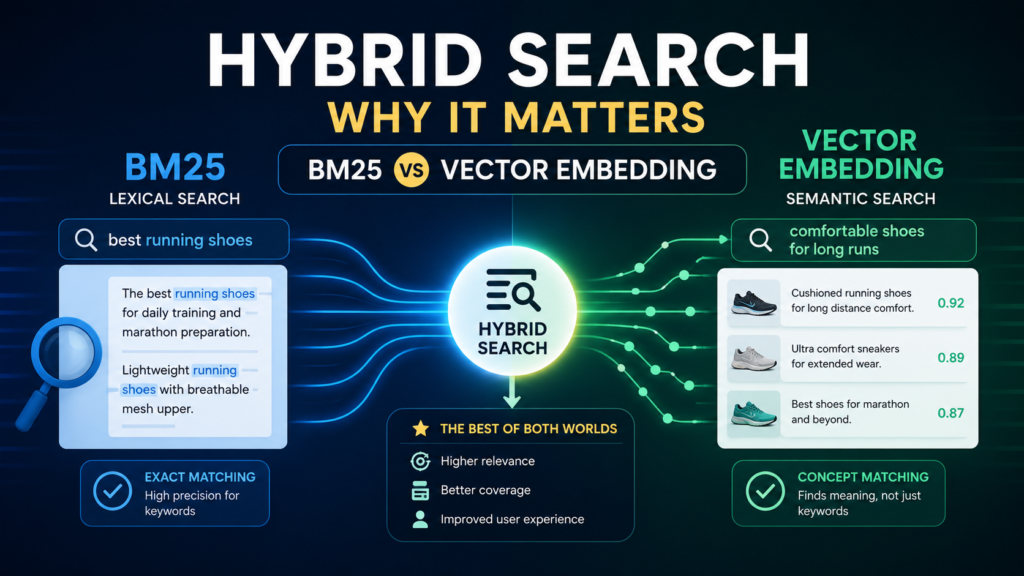
Search systems used to be built on keywords: find documents that contain the words the user typed. Then embeddings arrived, letting search match by meaning, so “how do I get my money back” finds a page titled “Refund policy”. It is tempting to replace keyword search with vector search entirely, but in practice each one fails where the other succeeds. Hybrid search runs both and combines the results, and it has become the standard approach for retrieval-augmented generation (RAG) and modern site search.
This guide explains both methods in plain English, shows how to merge them with reciprocal rank fusion, and builds a working version in Node.js. For animated walkthroughs, see the roadmap lessons on BM25 and hybrid search.
Keyword search with BM25
BM25 is the classic ranking formula behind most keyword search engines, including Elasticsearch, OpenSearch and the Lucene-based search in MongoDB Atlas. It scores a document higher when:
- it contains the query terms, and contains them more often, with diminishing returns so repeating a word ten times doesn’t win;
- those terms are rare across the collection, so a match on “E11000” counts far more than a match on “error”;
- the document is not unusually long, so long pages don’t win just by containing more words.
BM25 is fast, needs no machine learning, and is excellent at exact matches: product codes, error messages, names, version numbers and technical terms. Its weakness is vocabulary: it can’t tell that “cancel my subscription” and “end my plan” mean the same thing.
Vector search with embeddings
An embedding model turns text into a vector, a list of numbers, so that texts with similar meanings get nearby vectors. Vector search embeds the query and finds the closest document vectors, usually by cosine similarity, using an approximate nearest-neighbor index to stay fast over millions of documents. More background is in the embeddings lesson.
Vector search shines on meaning: paraphrases, synonyms, questions phrased differently from the docs, even other languages with a multilingual model. Its weaknesses mirror BM25’s strengths. It can miss exact identifiers, because “ORD-1042” and “ORD-1043” look almost identical as vectors, and it can confidently return something vaguely related when nothing actually matches.
Where each one fails
| Query | BM25 | Vector search |
|---|---|---|
MongoServerError E11000 |
Excellent: exact rare terms | Weak: codes have little “meaning” |
| “why can’t I save two users with the same email” | Weak: different words from the docs | Excellent: same meaning |
express 5 wildcard route |
Good | Good |
| “cheap phone with good camera” | Misses “budget smartphone” products | Finds them |
| A customer name or order id | Excellent | Unreliable |
Real users type both kinds of query, often in the same session. Hybrid search covers both.
Merging results: reciprocal rank fusion
The two searches produce scores on completely different scales: BM25 scores are unbounded numbers, cosine similarities fall between −1 and 1. Adding them directly makes no sense. Reciprocal rank fusion (RRF) sidesteps the problem by using only each document’s rank in each list:
RRF score(doc) = Σ 1 / (k + rank of doc in that list)A document ranked first gets 1/(k+1), second gets 1/(k+2), and so on, summed across lists. The constant k, commonly 60, dampens the advantage of the very top positions. Documents that appear high in both lists rise to the top, and a document that only one method found still gets a fair chance.
Implementing RRF in Node.js
// rrf.js
function reciprocalRankFusion(resultLists, { k = 60, limit = 10 } = {}) {
  const scores = new Map();
  for (const list of resultLists) {
    list.forEach((id, index) => {
      scores.set(id, (scores.get(id) ?? 0) + 1 / (k + index + 1));
    });
  }
  return [...scores.entries()]
    .sort((a, b) => b[1] - a[1])
    .slice(0, limit)
    .map(([id, score]) => ({ id, score: Number(score.toFixed(4)) }));
}

const keywordResults = ['refund-policy', 'shipping-times', 'cancel-order'];
const vectorResults = ['cancel-order', 'refund-policy', 'account-deletion'];

console.log(reciprocalRankFusion([keywordResults, vectorResults]));
Running it gives:
[
  { id: 'refund-policy', score: 0.0325 },
  { id: 'cancel-order', score: 0.0323 },
  { id: 'shipping-times', score: 0.0161 },
  { id: 'account-deletion', score: 0.0159 }
]
“refund-policy” and “cancel-order” were found by both methods, so they lead. The documents only one method found follow. If one method is more reliable for your data, weight it by multiplying its contributions, for example by 1.5, and test whether results improve.
Hybrid search with MongoDB Atlas
MongoDB Atlas offers both halves: Atlas Search for full-text search with BM25-style scoring, and Atlas Vector Search for embeddings. A straightforward approach runs both queries and fuses them in your Express code:
async function hybridSearch(query, limit = 10) {
  const queryVector = await embed(query); // call your embedding model

  const [keyword, vector] = await Promise.all([
    Article.aggregate([
      { $search: { index: 'articles_text', text: { query, path: ['title', 'body'] } } },
      { $limit: 20 },
      { $project: { _id: 1 } },
    ]),
    Article.aggregate([
      { $vectorSearch: { index: 'articles_vector', path: 'embedding', queryVector, numCandidates: 200, limit: 20 } },
      { $project: { _id: 1 } },
    ]),
  ]);

  const fused = reciprocalRankFusion(
    [keyword.map((d) => String(d._id)), vector.map((d) => String(d._id))],
    { limit }
  );
  const docs = await Article.find({ _id: { $in: fused.map((f) => f.id) } }).lean();
  const byId = new Map(docs.map((d) => [String(d._id), d]));
  return fused.map((f) => byId.get(f.id)).filter(Boolean);
}
Both searches run in parallel, so total time is roughly that of the slower one. Atlas has also been adding built-in ways to combine search stages inside one pipeline; check the current Atlas documentation for options available on your cluster. Other databases offer similar combinations: PostgreSQL with full-text search plus the pgvector extension, Elasticsearch and OpenSearch with built-in hybrid queries, and dedicated vector databases with keyword features.
Hybrid search in a RAG pipeline
In RAG, a language model answers questions using retrieved document chunks. Retrieval quality decides answer quality: if the right chunk isn’t retrieved, the model can’t use it, and may make something up instead. A typical pipeline:
- Split documents into chunks and store each chunk with its text and embedding.
- For each question, run keyword and vector search over the chunks.
- Fuse the results with RRF and keep the top 20–50 candidates.
- Optionally rerank the candidates with a cross-encoder or reranking model, which reads the query and each chunk together and scores relevance more precisely.
- Send the best handful of chunks to the language model, with instructions to answer from them and cite sources.
Hybrid retrieval plus reranking is a strong, widely used baseline. Measure it before reaching for more complex techniques.
Measuring whether it helps
Don’t assume hybrid search is better for your data; check. Collect 50–100 real queries with the documents that should be found for each. For each method, measure how often the right document appears in the top 5 or top 10 results (recall), and where it ranks (for example, mean reciprocal rank). Compare keyword only, vector only and hybrid. Run the comparison again whenever you change chunking, embedding models or weights. The roadmap’s RAG evaluation lesson covers this in depth.
Common mistakes with hybrid search
Adding raw scores together. BM25 scores and cosine similarities live on different scales, so a simple sum lets one method dominate. Use rank-based fusion such as RRF, or normalize both score lists carefully before combining them.
Embedding chunks that are too large. A chunk covering five topics produces a vector that represents none of them well. Smaller, focused chunks with a little overlap usually retrieve better; the roadmap explains the trade-offs in its chunking lessons.
Forgetting filters. Users often need results limited to their own account, a product category or recent dates. Apply the same filters to both the keyword and vector queries, otherwise fusion mixes in results the user should never see. For multi-tenant apps, this is a security issue, not just a relevance one.
Re-embedding inconsistently. Documents and queries must be embedded with the same model. When you switch models, re-embed every document, or vector search quietly gets worse.
Not handling “no good match”. Vector search always returns its nearest neighbors, even when nothing is truly relevant. For RAG, set a minimum relevance threshold after reranking, and let the model say it doesn’t know rather than answering from weak matches.
Frequently asked questions
Is vector search better than keyword search?
Neither is better everywhere. Vector search handles meaning and paraphrases; keyword search handles exact terms, codes and names. Combining them gives the most reliable results across real-world queries.
What value of k should I use in RRF?
60 is the common default and works well. Lower values give more weight to top-ranked results; test a few values against your own evaluation set if you want to tune it.
Do I need a separate vector database?
Not necessarily. MongoDB Atlas, PostgreSQL with pgvector, Elasticsearch and OpenSearch all support both keyword and vector search, which keeps your stack simpler.
What is reranking?
A second, more accurate scoring step applied to the top results from search. A reranking model reads the query and each candidate together, which is slower but more precise than comparing pre-computed vectors.
Does hybrid search make queries slower?
Slightly, because two searches run instead of one. Running them in parallel keeps the added time small, and the fusion step itself is very fast. For most apps, the better results are well worth it.

Saurabh
Saurabh Pathak is an AI engineer and MERN stack developer, and the founder of mernstackdev.com. He builds open-source projects such as the Haat gateway and MCP safety tooling, and he writes hands-on tutorials on React, Node.js, MongoDB and AI agents. He cares most about code that works in production.